

The CFO forwards the AWS invoice with one line attached: "why did this grow three months in a row while revenue was flat?" There is no FinOps team to hand it to. There is one ops person, a roadmap they are already behind on, and a quarter to show the board that cloud spend is governed rather than merely observed.
The standard answers to that question are expensive in exactly the way a company at this stage cannot afford. A dedicated FinOps hire is a six-figure commitment before they find their first dollar of waste. A percentage-of-savings cost tool takes a cut of exactly the savings you were trying to keep. This post argues for the third option: use the pricing levers already built into your own AWS account, plus the attribution and enforcement controls Convox layers on top of them, and let your existing ops person retire the month-end surprise this quarter. The outcome is spend that is attributed to specific services, capped before it runs away, and priced with the same AWS discounts any enterprise gets, without adding headcount or a tool contract.
Most AWS cost optimization content assumes an organizational structure you do not have. It assumes someone owns tagging strategy, someone reviews Cost Explorer weekly, someone negotiates commitments, and someone chases engineering teams about idle resources. When you have one ops person supporting five to thirty developers, none of that happens, and the bill grows in the dark until finance notices.
The one-person version has to be different in kind, not just smaller. It needs three properties. First, the levers must be pullable in an afternoon, not a quarter-long tagging project. Second, attribution must come for free from the platform, because nobody has time to maintain a cost allocation spreadsheet. Third, enforcement must be automatic, because the whole failure mode is that nobody is watching when the spend happens.
The rest of this post walks through those three properties as three escalating levers: choose cheaper capacity, see where spend actually goes, and cap what any single app can spend before it happens. Each one is a command your existing ops person can run this week, and each one produces an artifact you can put in front of the CEO or the board: a capacity policy, a per-service breakdown, and a set of enforced caps.
There is a structural point underneath everything else here, and it determines whether any of these levers are available to you at all. A self-hosted Convox Rack installs into your own AWS account. You pay AWS directly, and Convox adds no markup on that infrastructure. That sounds like a billing detail, but it changes what is possible: every AWS-native pricing mechanism applies to your instances because they are your instances. Spot capacity, reserved instances, savings plans, and any enterprise discount program you negotiate with AWS all land on the same EC2 line items the Rack runs on.
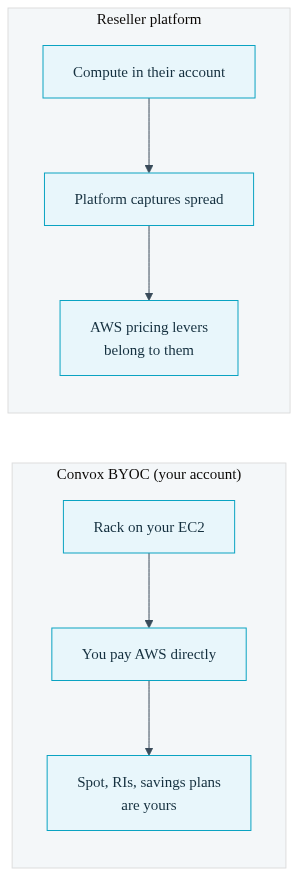
Contrast that structurally with any platform that resells compute. When the platform owns the account, the platform captures the wholesale-to-retail spread, and the AWS pricing levers belong to them, not to you. You cannot buy a savings plan against instances you do not own. With a Rack in your own account, the levers are yours, and your existing AWS knowledge, and any commitments you have already made, keep working.
The first lever a solo ops person can pull is capacity type. Spot instances are the same EC2 hardware sold at a steep discount because AWS can reclaim them with short notice. The published spot prices for your region and instance families are on the AWS spot pricing page; the arithmetic on your specific instance types is worth ten minutes of your ops person's time, and it is arithmetic you can redo yourself rather than a vendor's claimed percentage.
The honest trade-off is the reclaim. Spot capacity can disappear, and a production service that lives entirely on spot has an availability story that depends on AWS having spare capacity in your instance family. That is exactly why Convox exposes a mixed mode with an on-demand floor. The Rack parameter node_capacity_type accepts on_demand, spot, or mixed; in mixed mode, min_on_demand_count sets the number of on-demand nodes that are always present regardless of what happens in the spot market:
$ convox rack params set node_capacity_type=mixed min_on_demand_count=2 -r production
Updating parameters... OK
That single command establishes a capacity policy: baseline availability runs on guaranteed instances, and elastic overflow runs on discounted ones. It is the kind of decision a FinOps team would take a workshop to reach, expressed as two parameters your ops person sets once. For a deeper treatment of how container density and instance choices interact with the bill, see our guide on reducing AWS costs through container management.
Cheaper capacity lowers the rate. It does nothing about the question the CFO actually asked, which is where the money goes. That is an attribution problem, and on raw Kubernetes it is a genuinely hard one: cost allocation means mapping pods to nodes to instance prices, deciding how to split shared nodes across workloads, and keeping that pipeline alive as deployments churn. Teams typically solve it by installing and maintaining yet another tool, which is one more thing your one ops person babysits. We have written before about how the real cost of running Kubernetes hides in exactly this kind of operational overhead.
Convox builds the attribution in. Enable cost tracking with a single Rack parameter:
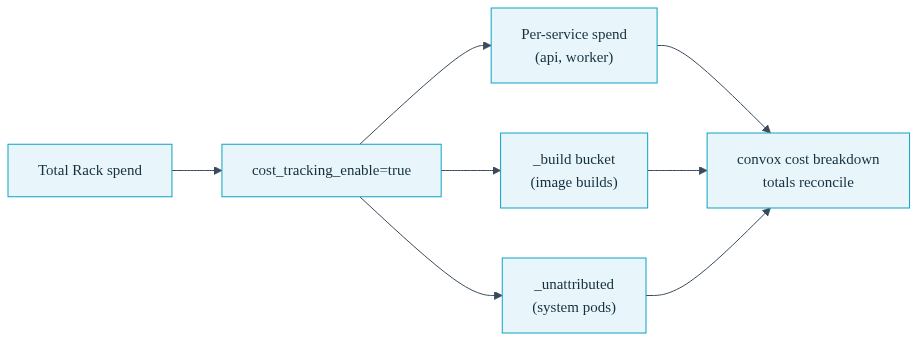
$ convox rack params set cost_tracking_enable=true -r productionCost tracking requires an AWS Rack on version 3.24.6 or later (Azure Racks are supported from 3.25.1; GCP, DigitalOcean, Equinix Metal, and Local Racks cannot enable it in the current release). Once the apply completes and the accumulator ticks, convox cost gives you a per-service breakdown of month-to-date spend, including which instance type and capacity type each service is actually running on:
$ convox cost --app myapp
SERVICE        INSTANCE     CAPACITY   ACTIVE-REPLICAS  SPEND-USD
api            t3.medium    spot       2                $0.08
worker         t3.small     spot       1                $0.04
_build         c5.large     on-demand  ($0.02)
_unattributed  t3.medium    on-demand  ($0.01)
TOTAL: $0.15
Two rows in that output deserve attention because they answer questions a manual attribution effort usually cannot. The _build bucket separates the cost of building images from the cost of running the service, so a heavy CI cadence does not silently inflate a service's apparent run cost. The _unattributed bucket captures system pods and sidecars that belong to no user-deployed service, so the total reconciles instead of leaving a mystery gap. The capacity column also gives you a running audit of your spot strategy: you can see, per service, which workloads landed on discounted capacity and which are still on demand.
There is one more flag worth knowing before you show these numbers to finance. If your company already has an enterprise discount program or a savings plan, the raw list-price accumulation will overstate what you actually pay. The pricing adjustment multiplier aligns tracked spend with your contract pricing; a company with a 30 percent committed-use discount would set it to 0.7 so the numbers Convox reports match the numbers on the invoice:
$ convox budget set myapp --pricing-adjustment 0.7Aggregated app totals, including a pricing-source stamp your ops person can cite, come from convox cost --aggregate, and the same data surfaces in the Console's cost overview with CSV export for the board deck. Two weeks of this data is an attribution baseline: which apps and services drive spend, in what proportion, on what capacity. That baseline is the evidence artifact for the "is spend governed" question, and it is also the prerequisite for the third lever.
Attribution tells you where last month's money went. Governance means deciding, in advance, what this month's money is allowed to do. That is what budget caps are for: a per-app monthly cap in dollars, an alert threshold, and an enforcement action that fires automatically when the cap is reached, whether or not anyone is watching.
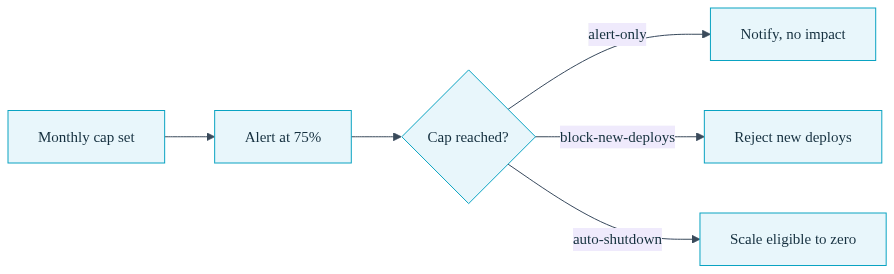
$ convox budget set myapp --monthly-cap 500 --alert-at 75 --at-cap-action block-new-deploys
Setting budget for myapp... OK
The at-cap action is the policy decision, and the three options map to three different risk postures:
| At-Cap Action | What Happens at the Cap | Best For |
|---|---|---|
| alert-only | Fires the cap event and any configured webhooks. No runtime or deploy impact. | Production apps, and the first month while you learn what each app costs |
| block-new-deploys | Running services keep running; new deploys are rejected with an over-cap error until the cap is raised, reset, or the month rolls over. | Staging and internal apps that should not grow further this month |
| auto-shutdown | After a notification countdown, eligible services are scaled to zero; services listed in neverAutoShutdown stay up. |
Review environments, demos, and anything where stopping spend beats staying up |
Auto-shutdown is the action people are rightly cautious about, which is why there is a dry run. Before arming it on anything, your ops person can rehearse exactly what would happen:
$ convox budget simulate-shutdown myapp
Simulating auto-shutdown for myapp...

Eligibility:
  worker: ELIGIBLE -- replicas=2, cost=$0.40/hr
  api: ELIGIBLE -- replicas=1, cost=$0.20/hr
  web: EXEMPT (neverAutoShutdown)

Status: SIMULATION COMPLETE. No changes made.
The simulation shows which services would scale down, in what order, and what the hourly saving would be, without touching the app. When a cap does trip, recovery is a deliberate, logged act rather than a scramble: convox budget reset acknowledges the breach, re-enables deploys, and restarts anything auto-shutdown scaled to zero, while convox budget cap raise lifts the cap when the growth turns out to be legitimate.
One design decision is worth calling out to a leadership audience because it is a governance feature, not friction. Changing a cap, changing the at-cap action, and clearing a budget all require the Admin role on the Rack. A developer, or a compromised read-write credential, cannot quietly raise a cap to unblock their own deploy. The person who set the spending policy is the person who can change it, and every budget mutation lands in the audit trail with the acting user's identity attached. That is precisely the control structure an auditor or a board member means when they ask whether cloud spend is governed.
Credibility requires naming what these levers do not cover. Everything above governs compute run through the Rack: the EC2 instances your services, builds, and system components consume. It does not see your S3 storage growth, your data transfer charges, your managed services outside the Rack, or a second AWS account your data team spun up last year. Those need their own review, and for most companies at this stage that review is a quarterly hour in Cost Explorer, not a hire.
There is also a real threshold past which dedicated FinOps tooling and eventually a FinOps function earn their cost: a genuinely large multi-account estate, chargeback across business units, or commitment portfolios complex enough that optimizing them is itself a job. If you get there, that is a good problem, and the attribution baseline you built with convox cost becomes the input to that function rather than wasted work.
The argument of this post is about sequencing. The failure pattern is buying the FinOps answer before exhausting the levers already in your account: capacity type, attribution, and caps. Those three cost your ops person a few afternoons. Compare that to the fully loaded cost of a FinOps hire, or a tool priced as a percentage of the savings it finds, and then compare both to what Convox actually costs, remembering that on a self-hosted Rack the infrastructure itself carries no Convox markup because you are paying AWS directly. For a company between $2M and $50M ARR, governed spend without new headcount is usually the right answer for at least the next several quarters.
Use the levers already in your AWS account, in order: run elastic capacity on spot with an on-demand floor via Convox's node_capacity_type and min_on_demand_count parameters, enable cost_tracking_enable to get per-service attribution from convox cost, then set per-app budget caps with automatic enforcement. Each step is a command, not a project, and your existing ops person can complete all three in a quarter.
Yes, if you keep a guaranteed floor. Setting node_capacity_type=mixed with min_on_demand_count keeps a fixed number of on-demand nodes running regardless of spot market conditions, so baseline capacity survives reclaims while overflow capacity gets the spot discount. Pure spot is best reserved for interruptible workloads like builds and staging environments.
Enable cost tracking with convox rack params set cost_tracking_enable=true (AWS Racks 3.24.6+), then run convox cost --app for a per-service breakdown showing instance type, capacity type, replicas, and month-to-date spend. Build pods appear in a separate _build bucket and system pods in _unattributed, so run costs stay clean and totals reconcile.
Whatever you configured as the at-cap action: alert-only fires notifications with no runtime impact, block-new-deploys rejects new deploys while running services continue, and auto-shutdown scales eligible services to zero after a countdown, sparing anything listed in neverAutoShutdown. Recovery is convox budget reset, and raising the cap requires the Admin role.
Yes. A self-hosted Rack runs on EC2 instances in your own AWS account, so reserved instances, savings plans, and enterprise discount programs apply to them like any other instances you own, and you pay AWS directly with no Convox markup on that infrastructure. Use the --pricing-adjustment flag so Convox's tracked spend matches your discounted contract pricing.
The decision-shaped version of this post fits in one quarter: enable cost_tracking_enable=true on a staging Rack this week, let convox cost run for two weeks to build your attribution baseline, then set budget caps on non-production apps first and graduate production to alert-only caps once the numbers stabilize. At the end of it you have a capacity policy, a per-service breakdown, and enforced caps to show the board.
Create a free account and install a Rack in your own AWS account, or review pricing against the cost of the hire you are avoiding. Questions about your specific spend profile? Talk to our team.


