
One SSRF bug in one container should not hand an attacker your node's IAM credentials. On a default EKS setup, it does. Any pod scheduled on an EC2 node can reach the instance metadata service at 169.254.169.254, and from there it is a short walk to the node's IAM role credentials and everything that role can touch: your container registry, EC2 APIs, autoscaling groups, and more.
Rack version 3.24.10 closes this path. The new pod_imds_block_enabled rack parameter blocks IMDS access from app pods entirely, and it ships alongside two companion parameters, karpenter_build_imds_tokens and karpenter_build_imds_hop_limit, that let you tune IMDS behavior on the Karpenter build nodepool independently of the rest of the rack. This post walks through the attack this defends against, what each knob controls, and a staged rollout recipe soyou can adopt it without breaking your builds or deploys.
The EC2 instance metadata service is a link-local HTTP endpoint that every EC2 instance can query at 169.254.169.254. It exposes instance details, and critically, the temporary credentials for whatever IAM role is attached to the instance. On an EKS cluster, that role is the node role: the permissions your worker nodes need to pull images, register with the cluster, and interact with AWS APIs.
Here is the problem. By default, a pod shares the node's network namespace enough to reach that same link-local address. So any process inside any container on the node can make this request:
curl http://169.254.169.254/latest/meta-data/iam/security-credentials/That returns the name of the node role. A second request to that path returns live AWS credentials: an access key, a secret key, and a session token. From there, an attacker holds whatever the node role holds. This is why probing IMDS is one of the first moves in almost every cloud penetration test. It turns a foothold in a single application container into node-level AWS access.
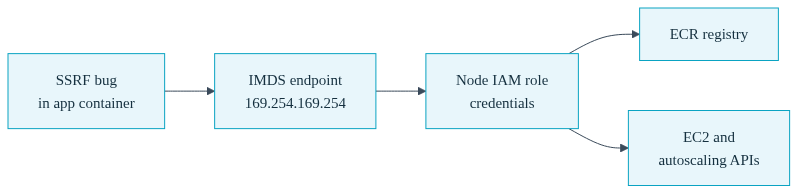
The dangerous version of this is a server-side request forgery bug. If one of your services fetches a URL that a user controls, an attacker can point it at 169.254.169.254 and exfiltrate the credentials without ever running code on your box. With IMDSv1, this is a single unauthenticated GET request. No token, no session, nothing to defeat.
IMDSv2 improves this. It requires a session token obtained with a PUT request before any metadata read, and it enforces a configurable hop limit on the response TTL so that requests forwarded through an extra network hop (like a pod proxying through the node) are dropped. Convox exposes this rack-wide through the existing imds_http_tokens parameter, which you can set to required to enforce IMDSv2 across the rack. IMDSv2 with a tight hop limit meaningfully raises the bar, but it does not fully close container access to the metadata service. The clean answer for app pods is to block the route entirely, which is exactly what pod_imds_block_enabled does.
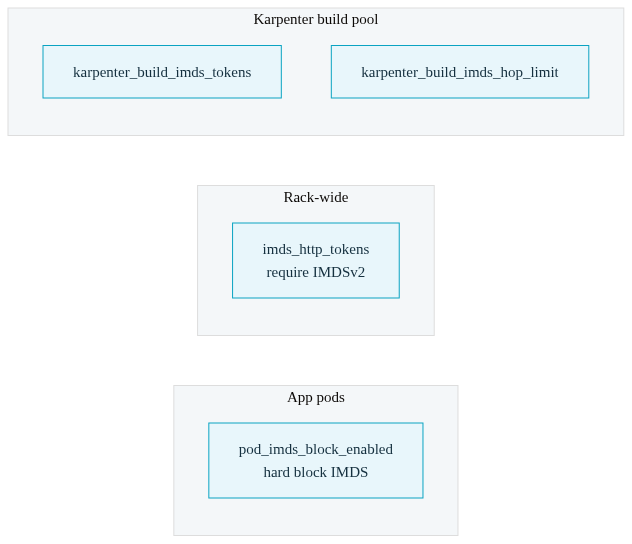
The 3.24.10 release gives you a small set of related controls. Understanding what each one governs keeps you from over-configuring or leaving a gap.
| Parameter | What it controls |
|---|---|
pod_imds_block_enabled |
Blocks app pod access to 169.254.169.254 so containers cannot reach the metadata service at all. |
imds_http_tokens |
Rack-wide IMDSv2 enforcement. Set to required to demand session tokens for every metadata read. |
karpenter_build_imds_tokens |
IMDSv2 token requirement on the Karpenter build nodepool, set independently of the rack-wide value. |
karpenter_build_imds_hop_limit |
IMDS response hop limit on the build nodepool, controlling how many network hops a metadata response can traverse. |
Think of it as two layers. pod_imds_block_enabled is the hard block for your running application pods, the workloads most likely to carry an SSRF or remote code execution bug. imds_http_tokens is the rack-wide IMDSv2 posture. The two karpenter_build_* parameters carve out the build nodepool so you can keep it working while you lock everything else down.
These parameters require rack version 3.24.10 or later. Check what you are on and update if needed. Remember that v3 racks update stepwise through minor versions, so if you are more than one minor behind, walk through the latest patch of each minor in turn (see CLI Rack Management).
$ convox rack -r rackName
$ convox rack update -r rackName
Once you are on 3.24.10 or later, enabling the pod block is a single parameter set:
$ convox rack params set pod_imds_block_enabled=true -r rackName
Updating parameters... OK
Setting a rack parameter triggers an infrastructure update, so the rack moves to an updating state while the change applies. Treat this like any other parameter change: apply it during a low-traffic window and watch the rollout with convox rack logs -r rackName.
I recommend pairing the pod block with rack-wide IMDSv2 enforcement so that anything still reaching the metadata service has to present a session token:
$ convox rack params set imds_http_tokens=required -r rackName
Updating parameters... OKBuilds do not run on your general application nodes. They run on the Karpenter build nodepool, which has different needs from your workload pods. Build tooling frequently talks to AWS services to push images to your registry, and depending on your setup it may lean on the node instance role and the metadata service to do so. Blocking IMDS everywhere with no distinction could break your builds.
That is why the build nodepool gets its own IMDS controls. karpenter_build_imds_tokens sets the IMDSv2 token requirement for build nodes, and karpenter_build_imds_hop_limit sets the hop limit for metadata responses on those nodes. Because they are separate from the rack-wide and pod-level settings, you can tighten your application pods aggressively while leaving the build pool with the access it needs.
$ convox rack params set karpenter_build_imds_tokens=required -r rackName
$ convox rack params set karpenter_build_imds_hop_limit=1 -r rackName
A hop limit of 1 keeps the metadata response on the node itself and prevents it from being forwarded through an additional hop, which is the pattern a pod would need to proxy the credentials out. Combined with required tokens, this is a tight posture for the build pool while still letting the node's own build process function.
The 3.24.10 release also shipped build_node_minimal_role_enabled, which gives the Karpenter build nodes a dedicated least-privilege IAM role instead of a broader shared role. This is the IAM-side complement to the IMDS controls. If a build node is ever compromised, minimizing what its role can do shrinks the blast radius even if an attacker does manage to reach its credentials. Enabling both the IMDS controls and the minimal build role is the belt-and-suspenders approach for the build pool.
The one real risk with blocking IMDS is that a service somewhere in your stack quietly depends on it. The AWS SDK default credential chain falls through to the instance metadata service as a last resort. If any of your apps get their AWS credentials that way rather than through an explicit mechanism, blocking IMDS will cut them off from AWS. So inventory first, test on staging, then roll to production.

Step 1: inventory. Identify any service that talks to AWS APIs. For each one, confirm how it authenticates. If it uses explicit credentials injected as environment variables, or a pod-level identity mechanism, it does not depend on IMDS and is safe. If it relies on the SDK default chain with nothing configured, it is probably falling through to the node role via IMDS and needs to be moved to an explicit credential source before you block.
Step 2: enable on staging. Set pod_imds_block_enabled=true on a staging rack first. Never flip this on production as your first test, and never flip it mid-incident, when you cannot afford surprises.
$ convox rack params set pod_imds_block_enabled=true -r stagingStep 3: verify the block. Once the staging update finishes, prove the route is closed from inside a running container. Start a one-off process and curl the metadata endpoint. You want this to hang or refuse rather than return data:
$ convox run web "curl -s --max-time 5 http://169.254.169.254/latest/meta-data/" -a myapp -r staging
curl: (28) Connection timed out after 5001 milliseconds
A timeout or a connection refused is the success case. If you still get a metadata document back, the block is not in effect yet; confirm the rack finished updating and that you ran against the right rack.
Step 4: confirm builds and deploys still work. Run a full deploy on staging and make sure the build completes and promotes. This exercises the build nodepool and proves your karpenter_build_* settings did not cut off something the builder needs.
$ convox deploy -a myapp -r stagingStep 5: promote to production. With staging verified and your apps exercising their normal AWS paths cleanly, set the same parameter on production during a low-traffic window and repeat the verification curl there.
The main gotcha is the one above: apps that lean on the node instance role through the SDK default chain will lose AWS access the moment you block IMDS. Move them to an explicit credential mechanism first. This is not a reason to skip the block; it is a reason to do the inventory step properly.
Do not flip this parameter mid-incident on production. A parameter change triggers an infrastructure update, and enabling the block changes how your pods reach AWS. Neither is what you want to introduce while you are already firefighting.
These parameters are AWS-specific, since the instance metadata service is an EC2 construct. If you are working through a compliance checklist, this feature sits naturally alongside the rest of the 3.24.10 hardening batch: pod security standards via pod_security_standard and pod_security_mode, seccomp defaults through seccomp_default_enabled, read-only system root filesystems with system_readonly_rootfs_enabled, and immutable ECR tags via ecr_immutable_tags_enabled. Blocking IMDS from pods is one of the highest-leverage items in that set, because it directly severs the most common credential-theft path in a Kubernetes cluster on EC2.
Full parameter reference lives in the AWS rack parameters docs: pod_imds_block_enabled, karpenter_build_imds_tokens, karpenter_build_imds_hop_limit, and imds_http_tokens. For everything that shipped in 3.24.10 and the version history you will walk through when updating, see the release notes.
Questions about adopting this on your racks? Reach us at support@convox.com.


