
You spent two years building relationships, credits, and reserved capacity in your AWS account. Then your deployment platform asked you to abandon it.
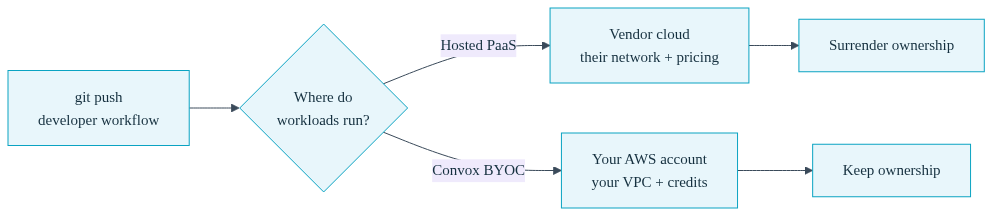
That is the quiet cost of most modern hosted platforms. The demo is great. The git push workflow is great. But the fine print is that your workloads now run in their cloud account, on their network, priced by their model. Your AWS account, the one with the startup credits, the savings plan you negotiated, and the RDS instance holding your production data, becomes a vestigial organ.
If you are the one person at your company who thinks about infrastructure, you have probably felt this tension. You want your developers to deploy without filing a ticket with you. You do not want to hire a platform team or spend your nights learning Kubernetes internals. But you also know, in your gut, that handing production to a vendor's cloud is a decision your future self will have to unwind. This post is about why that trade is a false choice, and how a bring your own cloud deployment platform gives you the developer experience without the surrender.
Hosted PaaS platforms are built on a simple bargain: give us your workloads, and we will make deployment painless. For a prototype or a side project, that bargain is fine. The problem is that the terms get worse precisely as your company gets more valuable.
Consider three scenarios that hit growing companies on a predictable schedule.
The compliance request. Your first enterprise prospect sends a security questionnaire. Question fourteen asks where customer data lives and who has network access to it. If your answer is "a multi-tenant platform we do not control, in a cloud account we cannot audit," that deal just got harder. If your answer is "our own AWS account, with IAM policies our team defines and CloudTrail logs we own," the conversation moves on. Ownership is not paranoia. It is a sales asset.
The VPC integration. Six months in, your app needs to talk to the RDS instance you already run, or an internal API, or an ElastiCache cluster. On a hosted platform, that traffic either crosses the public internet with all the security theater that implies, or you start paying for private networking add-ons and wrestling with tunnels. When your platform runs inside your own VPC, your services reach RDS over private networking because they are already there. No tunnel, no egress bill, no exception in your security review.
The invoice at scale. Hosted platforms price compute at a markup over the raw cloud cost, and the markup compounds as you grow. Meanwhile, the AWS credits your accelerator gave you expire unused, and the reserved instances you bought sit idle because your workloads moved somewhere those discounts cannot follow. At small scale nobody notices. At real scale, your finance lead notices, and now you are planning a migration under pressure instead of on your terms.
Convox Rack takes the opposite approach. Instead of moving your workloads into a vendor's cloud, Convox installs a complete deployment platform, called a Rack, directly into your existing AWS account (or GCP, Azure, or DigitalOcean). Everything runs on infrastructure you own. That single architectural decision preserves a surprising amount of value:
On top of that owned foundation, your developers get the workflow they actually wanted from a hosted platform: convox deploy builds and ships, convox env set manages configuration, releases are versioned, and rollbacks are one command. You stop being the deployment bottleneck without giving up the account.
"Installs into your AWS account" can sound hand-wavy, so here are the mechanics.

First, you connect your AWS account to the Convox Console through a runtime integration. On AWS, that means launching a CloudFormation stack that creates a scoped IAM role for Convox to assume. The role is the entire relationship. You can inspect exactly what it permits, and you can remove it at any time. There are no agents phoning home from outside your account and no credentials you cannot revoke.
Second, you install the Rack. Convox uses Terraform to provision an EKS-based cluster, networking, a private registry, and a load balancer inside your account. The install typically takes 10 to 20 minutes. When it finishes, you have a production-grade platform running on standard AWS building blocks, without you having written a single line of Terraform or a single Kubernetes manifest.
Third, and this is the part that matters for day two, you keep infrastructure-level control through Rack parameters. Want bigger nodes? Spot capacity for cost savings? A specific CIDR range so the Rack fits your network plan? Those are one-line changes:
$ convox rack params set node_type=c5.large node_disk=30
Updating parameters... OK

$ convox rack params set node_capacity_type=spot
Updating parameters... OK
Parameters also cover installing into an existing VPC (vpc_id, private_subnets_ids, internet_gateway_id), scheduled scale-down for non-production Racks (schedule_rack_scale_down), high availability mode, and dozens more. The point is not that you will tune all of these on day one. The point is that when your AWS-savvy instincts kick in, the knobs are there, and they map directly onto AWS concepts you already understand. Convox makes your existing AWS knowledge more valuable, not obsolete.
Here is a simple way to evaluate any deployment platform: imagine leaving it. What do you keep, and what do you have to rebuild?
With a hosted platform, leaving means a full migration. Your apps run on their proprietary runtime, your networking is their networking, your configuration lives in their dashboard, and your data may need to move clouds entirely. You rebuild everything under deadline pressure, which is exactly when you are most likely to make mistakes.
With Convox, the exit test looks very different. Your apps are plain Docker images built from your own Dockerfiles. Your application definition is a convox.yml manifest, a short readable file that describes services, databases, and scheduled jobs, and it is portable across Racks and across cloud providers. Your workloads run on standard Kubernetes in your own account. Convox itself is open source. If you walked away tomorrow, you would keep your cluster, your images, your data, and your configuration. That is not a migration. That is just removing a convenience layer.
A typical convox.yml makes the portability concrete. This one file deploys the same way to a Rack in your AWS account, a Rack in GCP, or your laptop:
resources:
  database:
    type: postgres
services:
  web:
    build: .
    port: 3000
    health: /health
    resources:
      - database
  worker:
    build: .
    command: bin/worker
    resources:
      - database
The linked database resource injects a DATABASE_URL automatically, and when you are ready for managed durability you can switch it to AWS RDS in your account without changing application code. Again: your account, your data, your call.
| Question | Hosted PaaS | Convox Rack (BYOC) |
|---|---|---|
| Whose cloud account? | Theirs | Yours |
| Do AWS credits and reserved pricing apply? | No | Yes, Rack nodes are your EC2 instances |
| Private access to RDS and internal APIs? | Public internet or paid add-ons | Native, over your own VPC |
| Security team visibility? | Limited to vendor attestations | Full IAM and CloudTrail, in your account |
| What do you keep if you leave? | A migration project | Your cluster, images, and configs |
None of this is an argument that hosted platforms are useless. For a weekend prototype or a project that will never touch sensitive data, they are a reasonable default. But be honest about what the arrangement is: workloads on their infrastructure mean their control plane, their network, and their pricing model own your production. That is a fine trade to make knowingly for a prototype. It is a costly trade to discover you made for the product your company depends on.
Once the Rack is installed, the daily experience for your developers is deliberately boring. They write a Dockerfile and a convox.yml, and then:
$ convox apps create myapp
$ convox env set SECRET_KEY_BASE=... -a myapp
$ convox deploy -a myapp
Every deploy is a rolling update gated by health checks, with automatic rollback if the new release fails to come up healthy. Logs stream with convox logs, one-off commands and migrations run with convox run, and if you want push-to-deploy, Workflows connect GitHub or GitLab so merges to main ship themselves and every pull request can get a temporary review environment.
For you, the person who used to be the deployment bottleneck, the change is that you are no longer in the critical path of every release. You keep the parts of the job that need your judgment, capacity planning, cost tuning with spot instances and scheduled scale-down, network design, and hand off the parts that were pure toil. And because the whole thing lives in your AWS account under an IAM role you control, you never signed away anything to get there. When compliance requirements arrive later, the same Rack model supports HIPAA and GovCloud deployments, because the data never left your account in the first place.
Some teams reading this are earlier in the journey: no AWS account worth defending yet, no credits, no reserved capacity. For that stage, Convox Cloud Machines offers fully managed infrastructure with predictable pricing starting at $12 per month per machine, plus managed databases from $19 per month.
The crucial difference from other hosted options is the graduation path. Cloud Machines uses the same convox.yml and the same CLI as a Rack. When ownership starts to matter, when the compliance questionnaire arrives or the AWS credits land, you move the same manifest to a Rack in your own account. You are choosing a starting point, not a destination you will have to escape.
If you already have an AWS account, the fastest way to see this working is to install a Rack into it. Create a free Convox account, add a runtime integration for AWS, and install a Rack from the Console in about 15 minutes. The Getting Started Guide walks through every step, from the IAM role to your first convox deploy.
Starting smaller? Spin up a Cloud Machine and keep the same workflow for later. And if compliance or an existing VPC setup raises questions specific to your environment, reach out to our team and we will walk through it with you.


