

Here is a week that happens at a lot of companies between $2M and $50M ARR. On Monday, engineering shortlists the three cheapest ways to host the production app, because the CEO has made it clear that infrastructure spend needs to stay flat. On Thursday, the biggest enterprise prospect in the pipeline sends a 200-question security questionnaire. Those two documents are now in conflict, and one of them is about to invalidate the other.
The conflict is not about whether cheap hosting works. It usually works fine. The conflict is that the questionnaire, and the SOC 2 audit that typically follows it, asks questions a sticker price never priced in: where exactly does customer data live, who can touch production, and what is the record of every change. If your hosting platform cannot help you answer those, the cheap option stops being cheap. You pay for it twice: once on the monthly invoice, and again as a re-platforming project measured in engineer-weeks, run under deadline pressure, while a signed deal waits on the other side of the audit.
This post makes the case for evaluating hosting on total cost through the audit, not monthly invoice. It also makes the honest counter-case, because for some apps the lowest sticker price genuinely is the right answer.
The monthly invoice is the most visible number in a hosting decision and usually the least important one over an 18-month horizon. The numbers that actually move the budget are the ones that show up later and are never labeled "hosting" in the accounting system.
The first is the re-platforming project. If the platform you chose at month zero cannot produce the evidence an auditor or an enterprise security team asks for, someone has to move the app. That is not a weekend task. It is rewriting deploy pipelines, re-provisioning databases, migrating data, re-testing everything, and re-pointing DNS, done by your most senior engineers because they are the only ones who know where the bodies are buried. You can estimate this for your own team: count the services, estimate the engineer-weeks, multiply by your loaded weekly engineering cost. For most teams that line item alone exceeds several years of the price difference between the cheap platform and a more deliberate one.
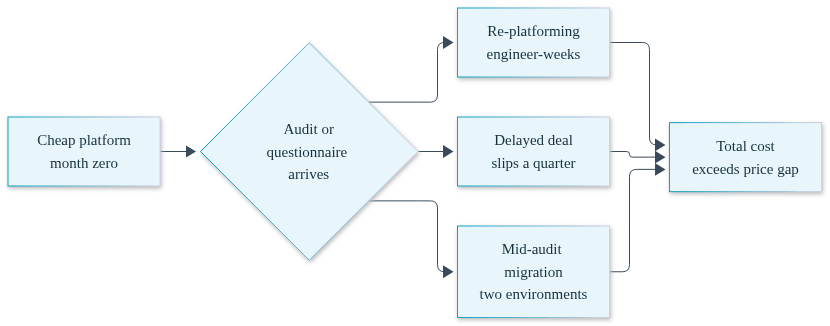
The second is the delayed deal. Security questionnaires arrive attached to revenue. When the honest answer to "describe your production access controls" is "we are migrating platforms to be able to answer that," the deal does not die, but it slips a quarter. At the ARR range where enterprise deals start arriving, a single slipped quarter on a single deal usually dwarfs the entire annual hosting budget.
The third is the opportunity cost of doing the migration during the audit window instead of before it. An audit period is the worst possible time to change how you deploy, because every change is itself something the auditor will ask about. Teams that re-platform mid-audit end up documenting two environments instead of one.
SOC 2 audits your controls, not your vendor's. But your hosting platform is where many of those controls physically live, so the evidence requests land on it. Three questions come up in nearly every audit and nearly every enterprise questionnaire, and they are exactly the three questions bargain platforms were not designed to answer.
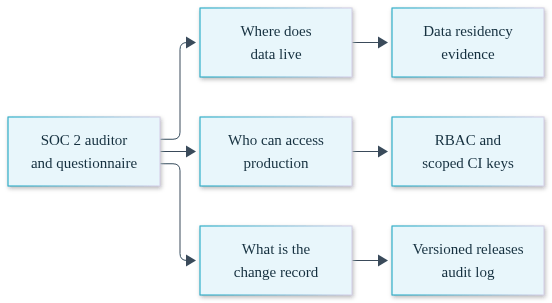
Where does customer data live? On a multi-tenant managed platform, the honest answer is "in the vendor's cloud account, on shared infrastructure, in a region we selected from a dropdown." That answer generates follow-up questions: who else runs on that infrastructure, what is the vendor's own audit posture, what happens to our data boundary if the vendor has an incident. When the app runs in your own AWS, GCP, or Azure account, the answer is one sentence: the data is in our account, in our VPC, and here is the account ID. The auditor can verify it directly.
Who can access production? The auditor wants named individuals mapped to permissions, and evidence that the mapping is enforced rather than aspirational. That means role-based access control with distinct read, write, and administrator tiers, and a way to show that the CI system deploys with a scoped credential rather than a human's full account. Platforms built for solo developers often have one permission level: in or out. That is a finding waiting to happen.
What is the change record? Every production change needs an answer to who, what, and when, plus a demonstrated rollback path. If deploys happen by whoever has the credentials running a script, reconstructing six months of change history for an audit is archaeology. If every deploy is a versioned release with a promote event attributed to a person, the change record is a report you export, not a project you staff.
Here is the concession, stated plainly: if the app will never face an audit, the lowest sticker price is the cheapest way to host it, full stop. A side project, an internal tool with no customer data, a prototype you expect to throw away, a marketing site. None of these will ever receive a security questionnaire, so paying anything for audit-readiness is waste. The total-cost argument in this post only applies when there is an audit, a questionnaire, or a regulated workload somewhere on your 18-month horizon.
Convox itself offers a product for exactly this case. Convox Cloud Machines are managed, Convox-hosted compute starting at $12 per month for an X-Small (0.5 vCPU, 1 GB RAM), which includes 250 free hours per month, scaling up to $150 per month for a Large. No cloud account required, no cluster to run, same convox.yml and deploy workflow. For a staging environment, a side project, or a team that wants managed simplicity and has no compliance trajectory, that is the honest recommendation.
And the trade-off on the other side deserves equal honesty. Self-hosting in your own cloud account means you own a cloud account: you hold the billing relationship with AWS or GCP or Azure, and you have a Rack to keep updated. Convox makes the updates a single convox rack update command rather than a Kubernetes operations practice, but it is still a responsibility that a fully managed platform takes off your plate. If nobody on your team wants that responsibility and no audit is coming, do not take it on.
If an audit or an enterprise questionnaire is coming, the calculus flips, because the evidence story becomes part of the price. This is where the self-hosted model earns its keep. A Convox Rack installs into your own AWS, GCP, Azure, or DigitalOcean account and gives your team a Heroku-style deploy workflow on infrastructure you own. Because the infrastructure is yours, your compliance posture inherits the controls of your own cloud account: your IAM boundary, your VPC, your encryption configuration, your region selection. There is no vendor between your auditor and your data plane. And because you pay your cloud provider directly for that infrastructure, there is no Convox markup on it; the AWS bill is the AWS bill.
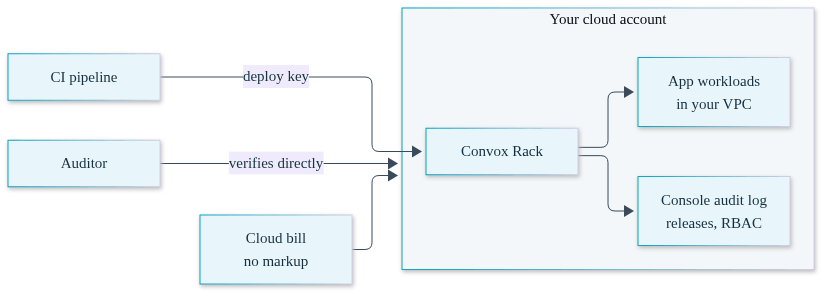
The three auditor questions from earlier each get a direct answer. Data residency: the workloads run in your account, verifiable from your own cloud console. Production access: role-based access control maps named users to read, write, or administrator permissions under a zero-trust model, and deploy keys give CI pipelines a deliberately restricted credential instead of a human login. Change record: every deploy creates a versioned release, every promote and rollback is an event, and the Console keeps a searchable audit log of who did what, when. This is what evidence-ready Docker hosting looks like in practice: the same containers you would run anywhere, with the paper trail built in.
Spend governance turns out to be audit evidence too, which surprises teams the first time an auditor asks how they would detect a runaway or unauthorized workload. Convox tracks per-app spend from your cloud provider's list prices once you enable it:
$ convox rack params set cost_tracking_enable=true
$ convox budget set myapp --monthly-cap 500 --alert-at 80 --at-cap-action block-new-deploys
$ convox cost --app myapp
The convox cost CLI breaks spend down per service, per instance type, and per capacity type, so "which workload is driving the bill" is a command rather than a spreadsheet exercise. Budget caps can alert at a threshold, block new deploys at the cap, or shut eligible services down entirely. Critically for the audit, every budget mutation is recorded as an audit event carrying the acting user's email in the actor field as of Rack version 3.24.6, so the answer to "who raised the cap and when" is in the log, attributed to a person. Cost tracking is supported on AWS Racks from 3.24.6, Azure from 3.25.1, and GCP from 3.25.9; it is not available on DigitalOcean Racks.
None of this makes Convox "SOC 2 certified," and no honest vendor should tell you a platform can be. The audit is yours, the controls are yours, and the attestation covers your organization. What the own-account model does is make the evidence yours too: compliance ready by architecture, with the control surface in an account you hold the keys to.
The worksheet is simple, and every input is either a published price or an estimate only you can make. On one side, price the own-account path: your cloud provider's list prices for the compute you need, plus Convox's platform pricing from the pricing page. On the other side, price the sticker-price path: the managed platform's monthly fee, plus a re-platforming line item in engineer-weeks at your loaded cost, plus whatever probability-weighted value you assign to a slipped enterprise deal.
| Line item | Sticker-price path | Own-account path (Convox Rack) |
|---|---|---|
| Monthly infrastructure | Platform's bundled per-service pricing | Cloud provider list prices, paid directly, no markup; plus Convox platform pricing |
| Re-platforming before or during audit | Your engineer-weeks estimate x loaded weekly cost | $0 if chosen before the audit window |
| Evidence collection | Manual reconstruction of access and change history | Audit logs, releases, RBAC reports, attributed budget events |
| Deal risk | Questionnaire answered after migration | Questionnaire answered from your own account |
As a labeled illustration, not a customer result: a team running a Rack on three t3.medium nodes in us-east-1 would pay AWS the published on-demand rate of $0.0416 per hour per node, roughly $91 per month of compute at 730 hours, plus the EKS control plane at the published $0.10 per hour, about $73 per month, plus load balancer and storage charges on the same bill. Every one of those numbers comes from AWS's public price list and lands on an invoice you already receive. Rerun it with your own instance types and counts; the point is that the inputs are checkable, not that this specific figure is yours.
Then fill in the re-platforming row honestly. If your estimate is six engineer-weeks and your loaded cost is what it is at your company, that single cell usually decides the worksheet. The monthly difference between platforms is noise next to it.
If no audit or enterprise questionnaire is coming, the lowest sticker-price managed host is genuinely cheapest, and Convox Cloud Machines start at $12 per month with 250 free monthly hours. If enterprise deals are likely within 18 months, a self-hosted Rack in your own cloud account is usually cheaper once re-platforming and deal delay are priced in.
Not automatically, but it often causes evidence problems. SOC 2 asks where data lives, who can access production, and what the change record shows. Multi-tenant platforms with single-tier permissions and no audit-attributed event history make those answers hard to produce, which turns an evidence request into a migration project at the worst possible time.
There is no universal number, which is exactly why you should estimate it yourself before choosing a host. Count your services, estimate engineer-weeks for pipelines, data migration, testing, and cutover, then multiply by your loaded weekly engineering cost. Add the revenue impact of any enterprise deal that waits on the migration. That total is the hidden price of the wrong platform.
Yes, because SOC 2 audits your controls, not your hosting vendor. The practical question is how much evidence the platform lets you produce: data residency, scoped access, and attributed change history. Hosting in your own cloud account simplifies this because you inherit your own account's controls and can show the auditor the environment directly, without a vendor in between.
It depends on scale and horizon. With a self-hosted Convox Rack you pay your cloud provider's list prices directly with no infrastructure markup, plus Convox's platform pricing, and you take on owning a cloud account and updating the Rack. Managed platforms bundle everything but control the environment. Compare total cost through your audit window, not monthly invoices.
The next step is a decision, not a deploy. Run the three-question framework: will an enterprise prospect send you a questionnaire within 18 months, will you need a BAA or SOC 2, and can your current platform answer where your data lives in one sentence? If any answer is yes, evaluate hosting on audit-readiness, not sticker price. Price out a Rack in your own AWS account using the published pricing, and pilot one non-critical app on it before the audit window opens, following the Getting Started Guide.
Create a free account and install a Rack in your own cloud account in about 20 minutes. If you are already fielding questionnaires or planning a SOC 2 timeline, talk to our team about what the evidence story looks like for your stack.


