

It is 11:47 PM. You are three tabs deep into a thread titled "How we set up VPC peering for our staging environment" because someone in a founder Slack said your deployment setup sounded "fragile." You do not know what VPC peering is. You are not entirely sure what a VPC is. You close the laptop.
Here is what you do know: you shipped a product that people pay for. You built the onboarding flow, the billing integration, the feature your biggest customer asked for last Tuesday. You lead a team of four engineers who trust you. And yet somewhere between the investor who asked "who handles your infrastructure?" and the job posts demanding "5+ years Kubernetes experience," you picked up a quiet, persistent anxiety that you are faking a part of this job.
This post is for you. Not to teach you AWS. To convince you that not knowing AWS is a completely rational position for a founder at your stage, and to show you a path where you start with zero infrastructure knowledge and end up genuinely owning your infrastructure, on your timeline, without ever rewriting your setup.
Let us reframe the anxiety first, because the framing is the problem.
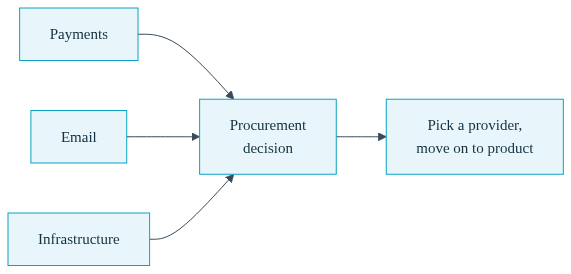
Nobody expects you to write your own payment processor. You use Stripe. Nobody expects you to run your own email servers. You use a provider. These are procurement decisions: you evaluate options, pick one that fits your stage, and move on to the work that actually differentiates your company. Somehow, infrastructure escaped this logic. There is a cultural script that says a "real" technical founder configures load balancers by hand, and a "real" startup has someone who dreams in Terraform.
That script was written by and for companies at a completely different stage than yours. At 2 to 8 engineers, infrastructure is not your product. It is plumbing. Every hour you spend learning IAM policies is an hour not spent on the thing customers pay you for. The best founders at your stage do not master infrastructure. They defer it, deliberately, and they defer it in a way that does not paint them into a corner later.
That last part matters, and it is where most of the standard advice falls apart.
When founders in your position ask for advice, they usually get one of two answers, and both are wrong for you.
Option one: learn it yourself. Spend evenings and weekends on EKS, networking, ingress controllers, and certificate management. Realistically this is months of opportunity cost before you are competent enough to run production safely, and even then you have built a system only you understand. You have turned yourself into the bottleneck and the bus-factor risk.
Option two: hire DevOps. A good infrastructure engineer costs $150,000 or more, and at your team size you are hiring them to solve a problem you do not have yet. Worse, a single infrastructure hire recreates the bottleneck in someone else's head: every deploy question, every environment issue, every "can you look at staging?" routes through one person.
There is a third option that the standard advice skips: use a platform that makes the decision reversible. Defer the infrastructure work now, but choose a platform where the day you genuinely need infrastructure ownership, you can take it, with the same configuration and the same skills you have been using all along.
This is exactly what Convox is built for, and it comes in two stages.
Convox Cloud Machines are managed compute that Convox runs for you. No AWS account, no Kubernetes cluster, no Terraform, no VPCs. You create a Machine in the Convox Console in under a minute, and it becomes the place your apps live. An X-Small Machine (0.5 vCPU, 1 GB RAM) costs $12 per month with 250 free hours to start.
Your entire application is described in one file called convox.yml. Here is a real, complete example for a web app with a managed PostgreSQL database:
resources:
  database:
    type: postgres
    options:
      class: dev
      version: "17.5"

services:
  web:
    build: .
    port: 3000
    resources:
      - database
Read that again and notice what is not there. No ingress configuration, no TLS certificates, no service accounts, no networking. The build: . line points at your Dockerfile. The port: 3000 line gets your service an HTTPS load balancer with automatic certificates. The resources block gives you a fully managed PostgreSQL database with automated 7-day backups, and linking it to your service automatically injects a DATABASE_URL environment variable your framework almost certainly already reads.
Deploying is three commands:
$ convox login console.convox.com
$ convox cloud apps create my-app -i my-machine
$ convox cloud deploy -i my-machine -a my-app
That is the whole workflow. When you need to set a secret, it is convox cloud env set STRIPE_KEY=sk_live_... -a my-app -i my-machine. When you need to run a migration, it is convox cloud run web "rake db:migrate" -a my-app -i my-machine. When something looks wrong, convox cloud logs streams everything. Every deploy creates a release, and rolling back a bad one is a single rollback command, not an incident.
The realistic starting bill: $12 per month for the Machine plus $19 per month for the dev-class database. Thirty-one dollars for real production hosting with HTTPS, managed Postgres with backups, rolling deploys, and instant rollbacks. This is a genuine production starting point for a startup without a DevOps engineer, not a toy tier you will outgrow in a month. Machines scale up to Large (4 vCPU, 8 GB at $150 per month), databases scale up to a large class with optional Multi-AZ failover, and a Machine can host multiple services and apps.
Here is the objection you should be raising right now: every simple platform is simple until you outgrow it, and then you pay the tax. You have probably watched teams migrate off a PaaS the hard way, rewriting deployment configuration from scratch under pressure, relearning everything mid-flight. Simplicity that ends in a rewrite is not simplicity. It is a loan with a balloon payment.

Convox is structured differently, and this is the part worth understanding even if you do not act on it for a year. Convox has two products that share the same application definition and the same CLI skills:
| Aspect | Cloud Machines (today) | Convox Rack (when you are ready) |
|---|---|---|
| Where it runs | Convox-managed infrastructure, no cloud account needed | Your own AWS, GCP, Azure, or DigitalOcean account |
| Setup time | Under a minute | 10 to 20 minutes via the Console |
| Pricing model | Fixed per Machine and database, from $12/month | Your cloud provider's infrastructure costs, with access to reserved instances and savings plans |
| Compliance | Standard workloads | HIPAA, SOC 2, GovCloud readiness; data never leaves your account |
| App definition | The same convox.yml | The same convox.yml |
The bottom row is the whole argument. The convox.yml you write today for a $12 Machine is the same file that deploys to a Rack running in your own AWS account. The deploy, env, logs, run, and scale commands you learn today are the same commands your whole team uses on a Rack. Moving between them is not a migration in the painful sense. It is a redeploy, and convox apps export and import carry your app configuration and data across.
Underneath, a Rack runs on standard Kubernetes in your account, so you are never boxed in by a proprietary runtime either. But you do not have to know or care about that on day one. That is precisely the point.
You do not graduate to your own infrastructure on a vibe or because a Slack thread made you feel behind. You graduate on a signal. Here are the ones that actually matter.
A customer security questionnaire asks where your data lives. Your first enterprise deal arrives with a vendor review, and one of the questions is whose cloud account holds customer data. With a Rack, the answer is "ours." The entire platform runs inside your own AWS account, which turns a hard conversation into a checkbox.
A compliance requirement lands. You sign a healthcare customer and HIPAA enters the picture, or an investor makes SOC 2 a condition. Because a Convox Rack keeps all infrastructure and data inside your own account, you can meet these requirements without re-architecting your application. Sensitive data never leaves your environment.
The economics flip. At meaningful scale, owning the infrastructure gets cheaper. Your own AWS account gives you cost levers, like reserved instances and savings plans, that fixed managed pricing cannot.
You simply want more control. Maybe you need GPU workloads, VPC peering (yes, the thing from the midnight thread, except now it is your call and your timeline), persistent volumes, or full Kubernetes access for a specific integration. A Rack gives you all of it, and the Cloud vs Rack comparison lays out the full feature delta.
And what does the move actually involve? You connect your cloud account to the Console with a runtime integration, install a Rack (10 to 20 minutes, mostly waiting for your cloud provider to provision the cluster), and redeploy the same manifest with convox deploy instead of convox cloud deploy. Your team's muscle memory carries over intact. Nobody relearns anything. Nothing gets rewritten. The getting started guide walks through the Rack install step by step, and it is roughly the same length as this section.
Here is the arc, stated plainly. Today, you deploy to production knowing nothing about VPCs, with a readable YAML file and three CLI commands, for about the price of a team lunch. Twelve or eighteen months from now, when an enterprise customer or an audit or your own ambitions demand it, you install a Rack in your own AWS account and redeploy the same file. At that point you are not a founder who deferred infrastructure. You are a CTO whose company owns its infrastructure, runs on standard Kubernetes, and got there without a $150k hire, without months of AWS study, and without a single rewrite.
That is what deferring deliberately looks like. The founders who feel behind are the ones who either burned months learning plumbing or bolted themselves to a platform they would have to escape. You can skip both mistakes with one decision.
The midnight VPC peering thread will still be there. The difference is that when you finally read it, it will be because you chose to, from inside your own AWS account, with your app already running there.
Ready to ship without the infrastructure anxiety? The Cloud Machines getting started guide takes you from zero to a deployed app in minutes, and the example apps include ready-to-deploy setups for Node.js, Rails, Django, Next.js, and more.
Create a free account and launch your first $12/month Machine today, with 250 free hours to start. When the graduation signals arrive, talk to our team about moving to a Rack in your own cloud account. The path is already built.


