
The auditor's access-control request usually lands about three weeks before the attestation deadline. It reads something like: "Provide evidence that each production workload can access only the AWS resources required for its function." And in a lot of companies between $2M and $50M ARR, the only complete answer to that question lives in the head of the engineer who set up the deployment eighteen months ago. Some of the access policy is in Terraform. Some was added in the AWS console during an incident. Some of it is a shared role that four services inherited because splitting it never made the sprint.
Reconstructing that map costs engineer days inside the audit window, which is exactly when those engineers are least available, because the same window usually overlaps a sales-driven deadline. The CEO sees the SOC 2 report as the thing unblocking two enterprise deals. You see three weeks of archaeology through IAM policies, and a real chance the auditor writes a least-privilege finding that pushes the attestation out a quarter.
There is a structural fix, and it is not "document better." It is making access control a declared property of the deployment itself, so the evidence exists continuously as a byproduct of shipping. This post walks through how Convox does that for Docker workloads on AWS: per-service IAM policy attachment declared in the deployment manifest, running in your own AWS account, so the roles, the policies, and the CloudTrail records are all first-party evidence your auditor can inspect directly.
The common paths for getting a Docker container onto AWS share one weakness: credentials attach at the wrong granularity. A container running on an EC2 instance typically inherits the instance profile, which means every container on that node holds the same permissions. A hand-rolled ECS or Kubernetes setup often starts with one task role or one service account shared across workloads, because creating a role per service is tedious and nobody is grading it until the audit. And policies managed partly in the console drift silently: an engineer widens a policy at 2am to unblock a deploy, and the change exists nowhere except the live AWS state.
None of this is a problem on the day you deploy. It becomes a problem on the day someone asks the least-privilege question, because now you have to prove a negative: that the payments worker cannot read the analytics bucket, that the web frontend cannot write to the queue. With a shared role, the honest answer is "it can, technically, but it doesn't," which is not an answer an auditor accepts. You end up doing one of two things, both expensive. Either you reconstruct the intended access map from memory and tribal knowledge and present documentation that may not match the deployed state, or you do an emergency role-splitting project under deadline pressure, which is precisely the kind of rushed IAM work that produces its own incidents.
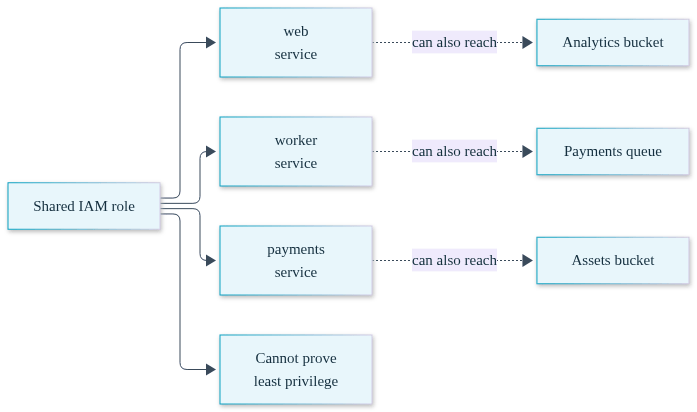
The deeper issue is that in these setups, least privilege is an operational promise rather than a property of the system. Promises require someone to keep them, continuously, across every deploy and every incident. Properties just hold. If you are the VP Engineering carrying the SOC 2 mandate without a dedicated security team, you want properties.
Convox Rack is a bring-your-own-cloud platform that installs into the AWS account you already own. Your containers, your data, your IAM roles, and your CloudTrail logs never leave your account. That matters for the evidence story in a way we will come back to, but first the mechanism.
Convox describes an application in a single manifest, convox.yml, which declares the services, the resources they use, and how they scale. On an AWS Rack with the pod identity agent enabled, each service in that manifest can declare exactly which IAM policies attach to it, using the accessControl.awsPodIdentity.policyArns field. The Rack handles the AWS pod identity wiring so that each service's processes receive credentials scoped to that service's policies and nothing else.
Enabling it is one Rack parameter, set once:
$ convox rack params set pod_identity_agent_enable=true -r productionFrom that point, IAM attachment per service is three lines of YAML per service. The scoping is not a wiki page describing intent, and it is not a Terraform module two repositories away from the application code. It is in the same file that defines the service, versioned in the same git history, reviewed in the same pull requests, and deployed in the same release. When the manifest says the worker holds two policies, the deployed state says the same thing, because the manifest is what produced the deployed state.
This is the shift from promise to property. "Each workload can access only what it needs" stops being something your team maintains through discipline and becomes something the deployment pipeline enforces by construction. If you want the broader picture of running Convox as the managed deployment layer on top of your own account, the AWS PaaS overview covers what else the Rack handles for you: load balancing, TLS, rolling deploys, and autoscaling, all inside your VPC.
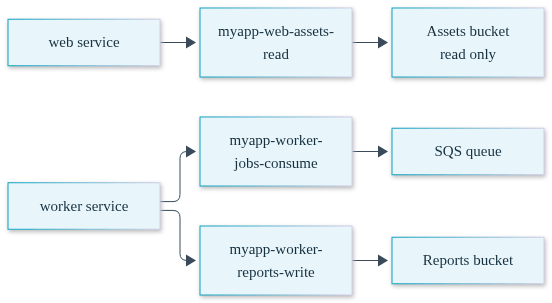
Take a typical two-service application: a web frontend that reads product images from an S3 bucket, and a background worker that consumes jobs from an SQS queue and writes reports to a different bucket. In the shared-role world, both services would hold the union of all four permissions. Here is what the scoped version looks like in convox.yml:
services:
  web:
    build: .
    port: 3000
    health: /healthz
    accessControl:
      awsPodIdentity:
        policyArns:
          - arn:aws:iam::123456789012:policy/myapp-web-assets-read
  worker:
    build: .
    command: bin/worker
    accessControl:
      awsPodIdentity:
        policyArns:
          - arn:aws:iam::123456789012:policy/myapp-worker-jobs-consume
          - arn:aws:iam::123456789012:policy/myapp-worker-reports-write
The policies themselves, myapp-web-assets-read and the two worker policies, are ordinary customer-managed IAM policies in your account. You author them once, scoped to the specific bucket and queue ARNs, and reference them here. The web service's processes can read the assets bucket and do nothing else in AWS. The worker service can consume its queue and write its reports bucket, and cannot touch the assets bucket at all. The least-privilege boundary between the two services is now visible in a code review diff.
The deployment flow does not change because of any of this. It is the same three commands you would use for any app, which matters when you are selling this pattern internally: the compliance posture adds zero steps to the developer workflow.
$ convox apps create myapp
Creating myapp... OK

$ convox deploy -a myapp
Packaging source... OK
Uploading source... OK
Starting build... OK
...
Promoting RBCDEFGHIJ... OK

$ convox services -a myapp
SERVICE  DOMAIN                                PORTS
web      web.myapp.0a1b2c3d4e5f.convox.cloud   443:3000
Every subsequent deploy follows the same path, documented in Deploying Changes: build, release, promote, with health-checked rolling updates and automatic rollback on failure. An engineer who changes a service's policy attachment does it in the manifest, gets it reviewed, and ships it through the same pipeline as a code change. There is no separate "IAM change process" to remember, which is exactly why the deployed state stops drifting from the documented one.
Here is where the architecture pays for itself. Because the Rack runs in your AWS account, everything the auditor wants to inspect is first-party. The IAM roles exist in your account. The policies are your customer-managed policies. CloudTrail in your account records the API activity of each service under its own identity, so access logs attribute actions to specific workloads rather than to one shared role that could have been anyone. There is no third-party platform sitting between your auditor and the control evidence, and no vendor attestation you have to take on faith about how credentials are handled, because the credential boundary is visible in your own account. This is the practical argument for BYOC over a managed-hosting model for regulated workloads: the evidence is yours because the infrastructure is yours.
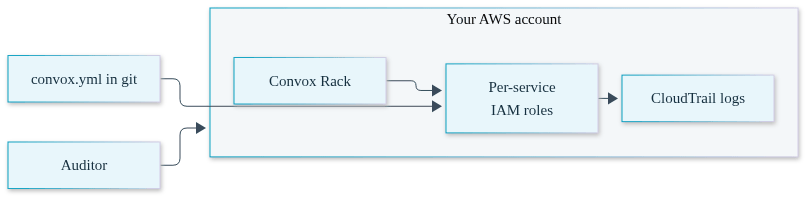
The manifest adds the change-management half of the story. SOC 2 auditors do not only ask what access exists today; they ask how access changes are requested, reviewed, and approved. A convox.yml in git answers that structurally. The commit history shows when each policy attachment was added and by whom. The pull request shows who reviewed it. The deploy history shows when it took effect. Documented state and deployed state cannot diverge, because there is only one state.
Compare the evidence pull for each specific auditor question:
| Auditor Question | Shared Role / Console-Managed IAM | Per-Service policyArns in convox.yml |
|---|---|---|
| What can this workload access? | Reconstruct from live IAM state, interviews, and whatever Terraform still matches reality | Read the service's policyArns list and the referenced policy documents |
| Who approved this access? | Often unanswerable; console changes leave no review trail | The pull request that changed the manifest |
| Does deployed state match documentation? | Requires a point-in-time audit to verify, and drifts again afterward | Structurally identical; the manifest produces the deployed state |
| Can you attribute API activity to a workload? | CloudTrail shows one shared identity for many services | CloudTrail in your account attributes activity per service identity |
The before-and-after in process terms: without this pattern, access-control evidence is a project you run during the audit window, staffed by the engineers who are also fixing whatever the auditor flags. With it, the evidence pull is reading files that already exist, which is work a single person can do in an afternoon without pulling anyone off the roadmap. We will not attach a invented number to that, but you can estimate it yourself: count the services in your production account, estimate the hours per service to reconstruct its effective permissions today, and compare that to the time it takes to open a git repository.
Be clear-eyed about what this does and does not give you, because your auditor will be.
You still author the policies. Convox scopes the attachment of policies per service; it does not write least-privilege policy documents for you. If you attach an ARN that grants s3:* on every bucket, you have per-service scoping of an overly broad policy, which is still overly broad, and an auditor reading the policy document will say so. The pattern narrows the problem from "audit every workload's effective permissions" to "review a handful of policy documents," which is a much smaller and more tractable problem, but it is not zero work. Plan a one-time pass to write tight policies per service when you adopt this.
This is an AWS pattern. The mechanism is AWS pod identity, enabled by the pod_identity_agent_enable parameter on an AWS Rack. Convox runs on GCP, Azure, and DigitalOcean as well, but the per-service policyArns attachment described here applies to AWS Racks. For a SOC 2 or HIPAA program already standardized on AWS, that is where you want the workloads anyway, since the compliance posture inherits your AWS account's controls.
Convox is compliance ready, not certified on your behalf. Running on a Convox Rack does not make you SOC 2 attested; it gives you an architecture where the access-control evidence is continuous, first-party, and inspectable. Your controls, your policies, and your audit are still yours. For HIPAA workloads, the Business Associate Agreement is signed with AWS, not with Convox, which is a direct consequence of the BYOC model: protected data lives in your account under your agreement with your cloud provider, and Convox is not in the data path as a business associate holding your PHI.
What you pay for. On a self-hosted Rack, your infrastructure bill goes to AWS directly at AWS prices, with no Convox markup on that infrastructure; Convox licensing is separate and predictable. And you do not need a platform team to run this. The Rack manages the Kubernetes layer, the deploys, and the identity wiring, which is the point for a team where the VP Engineering is also the de facto compliance officer. If that is your situation, the companion post on deploying to AWS without a DevOps team covers the operational side in more depth.
Deploy into your own AWS account with access control declared per workload in a versioned manifest. That keeps data and IAM evidence first-party for your auditor and gives every access change a commit and review trail. Convox Rack provides this as a managed deployment layer: your account, your policies, standard git-reviewed changes, no separate IAM change process.
Yes, on AWS Racks. With the pod_identity_agent_enable Rack parameter set, each service in convox.yml declares its own accessControl.awsPodIdentity.policyArns list. The service's processes receive credentials scoped to those policies only, so two services in the same app can hold entirely different AWS permissions.
No. On a self-hosted Rack your workloads and PHI run inside your own AWS account, so the Business Associate Agreement is signed with AWS. Convox is compliance ready through that inherited-controls architecture: because the platform runs in your account rather than hosting your data, it is not positioned as a business associate holding PHI.
No. The Rack manages the Kubernetes cluster, load balancing, TLS, rolling deploys, and the pod identity wiring. Your team writes a convox.yml and runs convox deploy. The remaining specialist work is authoring sensible IAM policy documents, which is a bounded one-time effort per service rather than an ongoing platform engineering function.
The new service declares its own policyArns in the same manifest change that creates it, so it ships with scoped access from its first deploy. There is no default shared role for it to fall into, and the pull request adding the service doubles as the access-approval record your auditor will ask for.
The low-risk way to evaluate this is a pilot: install a staging Rack in your own AWS account, deploy one real application, scope each of its services with policyArns, and then run a mock evidence pull. Hand a colleague the auditor's question, "show me what each workload can access and who approved it," and time how long the answer takes. If it is a git link and five minutes, you have found your audit-window savings before the audit window opens. The Getting Started Guide walks through installation and your first deployment.
Create a free account and install a Rack in your AWS account this week. For SOC 2, HIPAA, or GovCloud requirements, talk to our team about how other regulated engineering organizations structure the evidence trail before their first audit.


