

It is 9:47 on a Monday morning. There are six messages waiting in your Slack. Two are "can you deploy my branch to staging?" One is the database migration that has been sitting since Friday because you did not want to run it at 5pm. One developer needs an environment variable changed and cannot ship until it happens. Another wants to know why their service crashed over the weekend. The last one is just "hey, quick question about the load balancer."
If you are the one ops person at a 5 to 20 person startup, this is not a hypothetical. This is your inbox. And every single one of those messages represents the same structural problem: your team's deployment velocity is capped at your personal throughput. This post is about how to fix that with about one day of setup work, without giving up your AWS account, and without asking any developer to learn Kubernetes.
Let's put numbers on it. Say you support ten developers, and each one needs something from you three times a week: a deploy, a migration, an env var change, a log lookup, a scale adjustment. That is thirty interruptions a week. Each one costs you a context switch, which research on interrupted work consistently puts at 15 to 25 minutes of recovery time before you are back in flow. Call it 20 minutes per interruption. That is ten hours of your week gone, and that is just your side of the ledger.
The developer side is worse. When someone asks you to deploy their branch and you are heads-down in a VPC networking issue, they wait. Sometimes twenty minutes, sometimes until after lunch, sometimes until tomorrow. Multiply the average wait by thirty requests a week and you are looking at entire developer-days of blocked time. The deployment bottleneck is not an ops problem. It is a whole-company velocity problem that happens to be wearing your name.
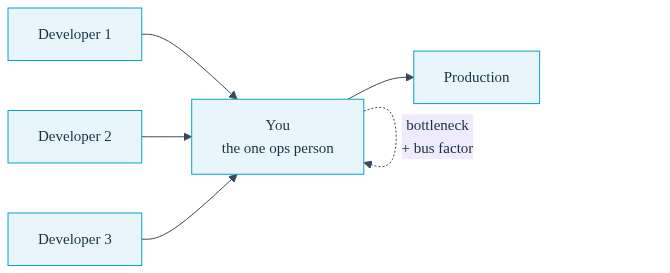
And there is a darker version of this math. If everything routes through you, you cannot take a real vacation, you cannot be sick, and if you ever leave, the company's ability to ship goes with you. Being the bottleneck is exhausting. Being the bus factor is a liability. Every solo ops engineer knows both feelings.
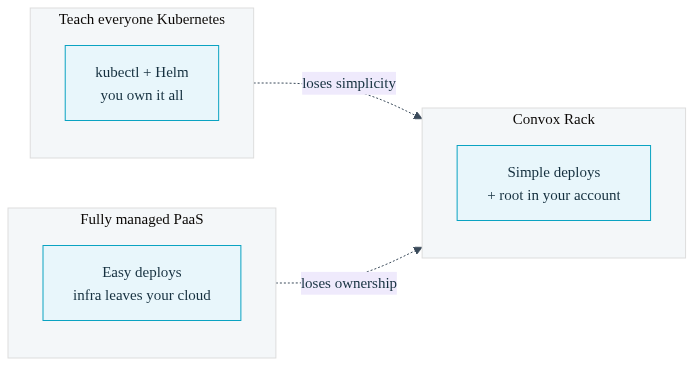
There are two standard answers to this problem, and both trade away something you cannot afford to lose.
The first answer is "teach everyone Kubernetes." Stand up EKS, hand out kubeconfigs, write some Helm charts, and tell developers to kubectl apply their way to freedom. In practice this replaces thirty deploy requests a week with thirty "why is my pod in CrashLoopBackOff" requests a week. Kubernetes is a powerful substrate, but its interface was designed for infrastructure engineers, not application developers. You have not removed yourself from the loop. You have become a helpdesk for a harder tool. And now you are also on the hook for every ingress controller upgrade, cert renewal, and cluster version bump, alone.
The second answer is "move everything to a fully managed platform." Deploys get easy, but the infrastructure leaves your AWS account entirely. Your cost levers disappear: no reserved instances, no savings plans, no visibility into what is actually running. If compliance requirements show up later, and at a growing company they usually do, you are re-platforming under pressure. And the AWS expertise you have built becomes irrelevant to your own production environment, which is a strange position for the person responsible for it.
What you actually want is a middle path: developers get a simple, safe, self-serve deployment interface, and you keep root on infrastructure that lives in your own cloud account. That is precisely the shape of a Convox Rack.
A Rack is an isolated environment of compute, networking, and storage that Convox installs into your own AWS, GCP, Azure, or DigitalOcean account. Under the hood it is a managed Kubernetes cluster, but neither you nor your developers ever have to touch kubectl for day-to-day work. You install it once from the Convox Console, which handles Terraform state and makes updates a one-click operation; installation typically takes 10 to 20 minutes while your cloud provider provisions the cluster. The full walkthrough is in the Getting Started Guide.
Then you create an app and describe it in a convox.yml manifest that lives in the repo, versioned alongside the code it deploys:
$ convox apps create myappenvironment:
- RAILS_ENV=production
resources:
database:
type: postgres
services:
web:
build: .
port: 3000
health: /health
scale:
count: 2
cpu: 250
memory: 512
resources:
- database
worker:
build: .
command: bin/worker
resources:
- database
timers:
cleanup:
schedule: "0 3 * * *"
command: bin/cleanup
service: workerThat one file defines the web service behind an automatically provisioned HTTPS load balancer, a background worker, a linked Postgres database whose connection string is injected as DATABASE_URL at runtime, health checks, resource limits, and a nightly cron job. The convox.yml reference covers every option, but most apps need fifteen to twenty lines. Compare that to the 150-plus lines of Deployment, Service, Ingress, Secret, and CronJob manifests the same app needs on raw Kubernetes.
The important architectural point is who owns what. You still own the infrastructure layer: instance types, node counts, networking, private subnets, and spot versus on-demand capacity are all Rack parameters you control with commands like convox rack params set node_type=c5.large. Because it all runs inside your AWS account, your reserved instance and savings plan pricing applies, your IAM boundaries hold, and your AWS knowledge stays valuable. Convox does not replace the work you have done building your infrastructure. It gives that work a clean interface so you stop being the only person who can operate it.
That is the whole setup: install the Rack, create the apps, write the manifests, tune the parameters. Depending on how many services you run, it is an afternoon to a couple of days. Everything after that belongs to your developers.
Here is what those thirty weekly Slack interruptions look like once developers have the Convox CLI. This is developer self-serve deployment in practice, as actual terminal sessions rather than promises.
"Can you deploy my branch?" becomes:
$ convox deploy -a myapp
Packaging source... OK
Uploading source... OK
Starting build... OK
Build: BABCDEFGHI
Release: RBCDEFGHIJ
Promoting RBCDEFGHIJ...
2026-03-18T14:30:53Z system/k8s/atom/app Status: Pending => Updating
2026-03-18T14:30:56Z system/k8s/web-745f845dc-rzl2q Started container main
OK
One command builds the Docker image, creates a release, and promotes it as a rolling update that keeps the old version serving traffic until the new one passes health checks. No YAML editing, no image tagging, no registry credentials to manage.
"Can you run this migration?" becomes a one-off process the developer runs themselves:
$ convox run web rails db:migrate -a myappThis spins up a fresh process with the same image, environment, and database credentials as production, runs the command, and tears itself down. The one-off commands docs also cover convox exec for shelling into a running process when debugging.
"Can you change this env var?" becomes:
$ convox env set FEATURE_FLAG=true --promote -a myapp
Setting FEATURE_FLAG... OK
Release: RCDEFGHIJK
Every environment change creates a new release, so there is a complete audit trail of who changed what and when, and any change can be reverted by rolling back the release.
"Why is my service slow?" and "can you bump the workers?" become:
$ convox logs -a myapp --service web --filter "ERROR" --since 2h
$ convox scale worker --count=4 -a myapp
Logs from every process are aggregated, timestamped, and filterable from the CLI, so "can you check the logs" stops being a request that lands on you. Scaling is one command, and you can define autoscaling ranges in the manifest so most scaling never involves a human at all.
"I broke production" becomes an instant, self-service recovery:
$ convox releases -a myapp
ID          STATUS  BUILD       CREATED        DESCRIPTION
RCDEFGHIJK  active  BABCDEFGHI  1 minute ago   env add:FEATURE_FLAG
RBCDEFGHIJ          BABCDEFGHI  5 minutes ago  build 0a1b2c my commit

$ convox releases rollback RBCDEFGHIJ -a myapp
Rolling back to RBCDEFGHIJ... OK
Because Convox keeps the full history and state of every release, a rollback is just promoting a known-good copy. The developer who shipped the bug fixes it in the time it would have taken to write the Slack message asking you to fix it.
The reasonable objection at this point is: "if I hand deploy access to ten developers, one of them will eventually take down production or run up a bill." That is exactly the failure mode Convox's guardrails exist to prevent, and they are the reason delegation is safe rather than reckless.
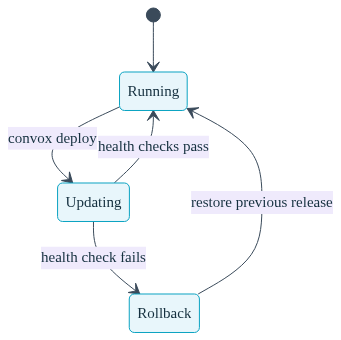
Automatic rollback on failed deploys. Every app moves through a defined status lifecycle: running, updating during a deploy, and rollback if things go wrong. When a promoted release fails to start, fails to bind its port, or fails its health checks, Convox reverses the rollout automatically and returns every process to the previous release. A bad deploy does not become an outage. It becomes a log line and a lesson, and the developer sees exactly which health check failed in the promotion output.
Self-diagnosis with deploy-debug. The classic post-delegation trap is that developers can now deploy but still ping you the moment a deploy fails, because the failure is invisible to them. convox deploy-debug closes that gap. It inspects the app's pods server-side, no kubectl or kubeconfig required, and translates Kubernetes failure states into plain-language hints:
$ convox deploy-debug -a myapp
--- Processes ---
  web  not-ready
    state: Running    ready: 0/1    restarts: 0
    hint: Containers are not ready -- health check may be failing
    --- Current Logs (last 2 lines) ---
    Node.js app listening on port 3000
    Error: ECONNREFUSED connecting to database
Crash loops, image pull errors, out-of-memory kills, and unschedulable pods each map to an actionable message like "process ran out of memory, increase scale.memory in convox.yml." The developer diagnoses and fixes their own failed deploy, and the ticket never reaches you.
Budget caps so no one runs up a surprise bill. The other fear with self-service is cost. Convox tracks per-app spend inside your account and lets you enforce a hard monthly cap per app:
$ convox budget set myapp --monthly-cap 500 --alert-at 80 --at-cap-action block-new-deploysYou choose what happens at the cap: alert only, block new deploys while keeping the app running, or automatically scale services down. Cap changes require an admin role, so a developer cannot quietly raise their own limit, and convox cost --app myapp shows exactly which service is driving spend. The full model is in the Budget Caps docs. This is delegation with a financial seatbelt, which is what makes it defensible to your CTO.
Layer on the Console's role-based access control and you can scope exactly who can deploy which apps to which environments, with a full audit log of every action. Developers get velocity inside boundaries you draw.
Here is the trade space for a team with one ops person and ten developers:
| Concern | Raw EKS | Fully Managed PaaS | Convox Rack |
|---|---|---|---|
| Developer deploys | Requires kubectl, Helm, and manifest knowledge per developer | Simple, but on someone else's infrastructure | convox deploy, no Kubernetes knowledge needed |
| Infrastructure ownership | Yours, plus all the maintenance burden | Gone; no AWS cost levers, hard compliance story | Yours; runs in your account, your IAM, your pricing |
| Failed deploy handling | Whatever you build yourself | Varies by platform | Automatic rollback on failed health checks, built in |
| Cost control | Manual tagging and billing analysis | Platform pricing on top of usage | Per-app budget caps with enforced actions |
| Ops load per deploy | High: you are the helpdesk | Low, at the cost of control | Near zero, and you keep root |
One honest note on the migration path: getting an app onto Convox means having a Dockerfile and writing that convox.yml. If your services are already containerized, this is an hour of work per app. If they are not, the migration guides walk through the translation from Heroku Procfiles, docker-compose files, and other setups, and there are example apps for Node.js, Rails, Django, and more to crib from. It is a one-time cost, and it is yours to do once rather than a skill every developer must acquire.
Six months after teams make this switch, the pattern is consistent. The deploy-request channel goes quiet. Developers ship several times a day because nothing stands between a merged PR and production except convox deploy, and many wire that into CI with Workflows so pull requests get automatic preview environments and merges to main deploy themselves. Rollbacks stop being incidents and become routine. And the ops person, the one who used to spend ten hours a week as a human deploy queue, spends that time on the work that actually needs infrastructure expertise: cost optimization, capacity planning, security posture, the next architectural decision.
You do not become less important. You become leverage. One ops person running Convox is not a bottleneck for ten developers; they are the reason ten developers ship without one. That is the version of the job worth keeping, and it is also the version where you can finally take a vacation. Convox customers churn at less than one percent annually for a simple reason: once the bottleneck is gone, nobody volunteers to bring it back.
You can prove this out in an afternoon. Install a production Rack through the Console in about 15 minutes, deploy the Node.js example app following the deployment tutorial, and then hand the CLI to one developer this week. Watch what happens to your Slack.
Create a free Convox account and install your first Rack today. Questions about your specific setup? Reach out to our team.


