
The platform that was perfect at $0 a month is now a real line on your budget, and it just showed up in a customer's security questionnaire. The deploy experience that got your team shipping fast has not changed. What changed is you: more traffic, more services, a bigger bill, and an enterprise prospect asking where their data lives and who can access it. Somewhere in your Slack, an engineer has already asked the quiet question: are we going to have to migrate again?
That second migration is the real cost this decision controls. A platform re-migration for a growing team is a quarter of roadmap, minimum: rewriting deploy configs, re-testing every service, re-cutting DNS, and carrying production risk the whole way. The way to avoid paying for the same migration twice is to evaluate platforms against the company you will be in two years, not the deploy experience of the company you are today. That means three questions: who owns the account your app runs in, what does the cost structure look like at twice the traffic, and what happens when compliance arrives. This post compares Render, Railway, and Convox on exactly those axes. It is Convox's comparison, published on Convox's blog, and it stays credible the only way a vendor comparison can: by being factual about all three.
All three platforms give you a modern deploy workflow: push code, get a build, get a running service with HTTPS. The differences live underneath the workflow, in who owns the infrastructure, how the bill scales, and what the platform can offer when a security review lands on your desk.
| Attribute | Render | Railway | Convox |
|---|---|---|---|
| Where your app runs | Render's infrastructure | Railway's infrastructure | Your own AWS, GCP, Azure, or DigitalOcean account (Rack), or Convox-managed Cloud Machines |
| Who bills you for compute | Render, per its published pricing | Railway, per its published pricing | Rack: your cloud provider directly, with no Convox markup on infrastructure. Cloud Machines: Convox, at fixed per-machine rates |
| Underlying runtime | Proprietary managed platform | Proprietary managed platform | Standard Kubernetes (EKS, GKE, AKS, DOKS) managed for you |
| Compliance posture | Depends on Render's controls | Depends on Railway's controls | Compliance ready via controls inherited from your own account; supports HIPAA workloads and AWS GovCloud regions |
| Config format | render.yaml |
Dashboard and config-as-code | convox.yml, portable between Cloud Machines and Racks |
| Setup time | Minutes, fully hosted | Minutes, fully hosted | Cloud Machines: under a minute. Self-hosted Rack: 10 to 20 minutes |
Every cell above is a structural attribute, not an opinion score. The rest of this post walks through why each row matters more the further you get from the free tier.
Render and Railway share the same fundamental architecture: they are managed platforms that run your workloads on infrastructure they own and operate. You bring code, they bring everything else. That model is exactly why onboarding is fast, and it is also the property that never changes no matter how much you grow. Your production data lives in an account you do not own, on infrastructure you cannot inspect, under controls you inherit from the vendor rather than define yourself. For a five-person team validating a product, that is a fine trade. For a company heading into enterprise sales, it becomes the single hardest thing to explain in a security review.
Convox splits this question in two. A self-hosted Rack installs into a cloud account you already own: AWS, GCP, Azure, or DigitalOcean. Convox provisions and manages a standard Kubernetes cluster (EKS on AWS, and the managed equivalents elsewhere) inside your account, your VPC, your IAM boundary. The workloads, the data, the logs, and the billing relationship all belong to you. Convox is the management layer, not the landlord. Because the runtime is standard Kubernetes rather than a proprietary substrate, your security team can review it directly, and if Convox disappeared tomorrow, the cluster would still be yours, running in your account.
For teams that are not ready to own a cloud account, Convox also offers Cloud Machines: fully managed compute on Convox-hosted infrastructure, comparable in operating model to Render and Railway. The difference that matters for the two-year view is that both Convox products run the same convox.yml and the same CLI. An app you deploy to a Cloud Machine today deploys to a Rack in your own AWS account later without a rewrite. That portability is the structural answer to the fear of paying for the same migration twice: the first move onto Convox is the last config migration, because the config carries across the ownership boundary.

If you are weighing the two-way matchups in detail, Convox publishes dedicated breakdowns: Convox vs Render and Convox vs Railway.
Comparing three pricing pages line by line is the wrong exercise, because the pages will change and your usage will change faster. What does not change is the structure of who prices your compute.
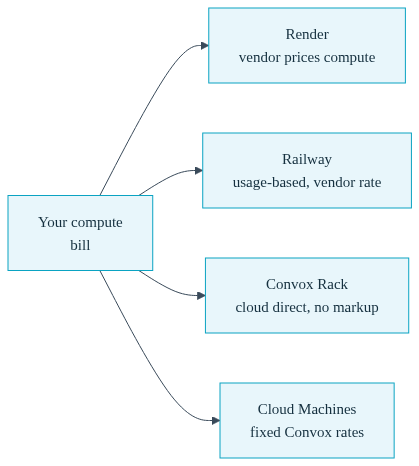
On Render and Railway, the platform prices the compute. You pay the vendor according to its published pricing model (per-service plans and usage on Render, usage-based billing on Railway), and the vendor's margin is built into the rate. That is a completely legitimate model, and at small scale the convenience is worth far more than the margin. The structural point is that as your footprint grows, every unit of growth flows through the vendor's price list, and you have no lever on the underlying rate.
On a self-hosted Convox Rack, the cost structure inverts. You pay your cloud provider directly for the instances, load balancers, and storage the Rack uses, at your negotiated rates, and Convox adds no markup on that infrastructure. Convox charges for the platform itself (plans are on the pricing page), and the compute bill is between you and AWS. That distinction compounds as you grow, because direct cloud billing puts every cost lever the cloud offers in your hands: reserved instances, savings plans, spot capacity, and instance right-sizing. Convox exposes these directly. On AWS, the node_type and node_capacity_type Rack parameters let you choose instance families and run spot or mixed capacity, and per-app budget caps can alert, block deploys, or scale services down when a monthly spend cap is hit. None of those levers exist when a vendor abstracts the cloud away from you.
Convox Cloud Machines sit in a third position: fixed, published, Convox-priced rates. An X-Small machine (0.5 vCPU, 1 GB) is $12 a month and includes 250 free hours per month; Small is $25, Medium is $75, Large is $150, with build resources included. To be precise about the boundary: because Cloud Machines are Convox-hosted and Convox-priced, the "no infrastructure markup" property applies only to self-hosted Racks, never to Cloud Machines. What Cloud Machines give you instead is a predictable fixed bill and a zero-friction on-ramp to the same config format that later runs in your own account.
A worked illustration of the decision, using only inputs you can verify yourself: a team running a web service and a worker that together fit in 2 vCPU and 4 GB could run a Medium Cloud Machine at a documented $75 a month, all-in and fixed. The same team on a self-hosted AWS Rack would instead pay AWS list price for the nodes the Rack runs (published on AWS's pricing pages), plus the EKS control plane and a load balancer, with no Convox markup on any of it, plus their Convox plan. At small scale the fixed machine is simpler. As the footprint multiplies, direct billing with cloud-native discounts becomes the cheaper curve, and the point of this comparison is that with Convox you can move from one curve to the other without changing platforms.
The requirements that arrive after the free tier are rarely about deploy speed. They are about what your platform can prove.
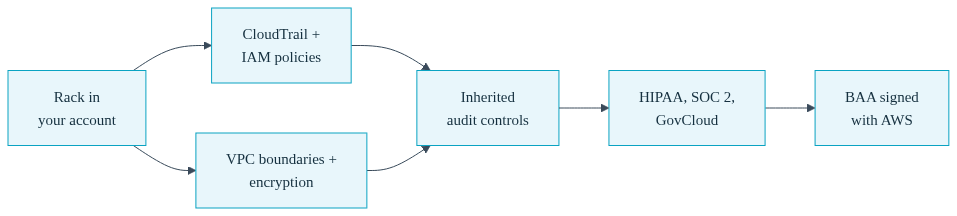
Compliance. When an enterprise customer or an auditor asks where data lives and who can access it, a managed platform's answer is necessarily "in our environment, under our controls." Sometimes that is enough. When it is not, when the requirement is HIPAA, SOC 2 evidence tied to your own infrastructure, or a government workload that must run in AWS GovCloud, the architecture has to change. A Convox Rack answers those questions structurally: the infrastructure runs in your own account, so audit controls are inherited from the account you already own and can already show an auditor. CloudTrail, IAM policies, VPC boundaries, and encryption settings are yours to configure and yours to evidence. Convox is compliance ready through this inherited-controls model; it supports HIPAA workloads and runs in AWS GovCloud regions. One precision worth stating because auditors will ask: a HIPAA customer signs their Business Associate Agreement with AWS, whose HIPAA-eligible services host the workload, not with Convox. That is exactly the arrangement a BYOC architecture makes possible, and it is not an arrangement a platform running on its own infrastructure can offer at all.
Deploy workflow parity. The reasonable fear about leaving a managed platform is losing the developer experience. Here is the actual Convox workflow, so you can judge parity directly:
$ convox apps create myapp
$ convox deploy -a myapp
$ convox scale web --count=2 -a myapp
$ convox releases rollback RBCDEFGHIJ -a myapp
Every deploy creates a release; every release is a rollback target; every promotion is a health-checked rolling update that reverses automatically if the new version fails its checks. Environment variables, one-off commands with convox run, and log streaming with convox logs all work the way you would expect from a Heroku-lineage workflow.
Autoscaling and environments. Scaling is declared in the same manifest that defines the app. A service that should run between two and six replicas, adding capacity when CPU crosses 70 percent, looks like this:
services:
  web:
    build: .
    port: 3000
    health: /healthz
    scale:
      count: 2-6
      targets:
        cpu: 70
  worker:
    build: .
    command: bin/worker
Because the whole app is one file, staging and production parity is a solved problem: the same convox.yml deploys to a staging Rack and a production Rack, with only environment variables differing. Advanced scaling, including event-driven triggers and scale-to-zero, is available on Racks because the substrate is real Kubernetes rather than a fixed-shape container slot.
Migration cost, measured honestly. Moving off a managed platform is real work, and pretending otherwise would undermine everything else in this post. What Convox does is bound the work: the Render migration guide maps render.yaml concepts (web services, workers, cron jobs, managed Postgres and Redis, environment groups) field by field onto their convox.yml equivalents, and equivalent guides exist for Heroku, Fly.io, and Docker Compose. The recommended cutover pattern keeps your current platform serving production while you validate the Convox deployment on its generated hostname, and moves DNS last, so there is a working rollback target through the entire migration.
Render fits teams that want a fully hosted platform, have no requirement to own the account their workloads run in, and are comfortable with the vendor's pricing model as their long-term cost structure. Railway fits teams with the same profile who prefer its usage-based billing and product experience. Both are legitimate choices for teams that never intend to take on cloud account ownership, and nothing in this post argues that every team must.
Convox fits the team this post is written for: the one whose growth curve makes the two-year questions unavoidable. If you can already see the enterprise security questionnaire coming, if your platform bill is growing faster than revenue, or if compliance readiness is a when rather than an if, then account ownership is the requirement that decides the platform, and Convox is the option among the three built around it. The honest trade-offs: a self-hosted Rack means owning a cloud account and its bill, which is a responsibility, not just a lever, and Rack installation is a documented 10 to 20 minutes against under a minute for fully hosted options. Teams with zero cloud experience should expect the containerization step (a Dockerfile plus a convox.yml) to take real, if bounded, effort.
The two-product structure is what makes the choice non-binary. Start on a Cloud Machine at a fixed $12 to $150 a month with no cloud account at all, and move the same app, same manifest, same CLI, to a Rack in your own account when ownership starts paying for itself. That path is the difference between choosing a platform and choosing your next migration.
Yes. Convox provides the same push-to-deploy workflow, releases, rollbacks, and scaling that teams use Render and Railway for, with one structural difference: a Convox Rack runs in your own AWS, GCP, Azure, or DigitalOcean account rather than on the vendor's infrastructure, and Convox Cloud Machines offer a fully managed option at fixed published prices.
Yes. A self-hosted Convox Rack installs a managed Kubernetes environment directly into your own AWS account (GCP, Azure, and DigitalOcean are also supported). Your workloads, data, IAM controls, and cloud billing relationship stay entirely inside the account you own, and Convox adds no markup on that infrastructure.
Yes, and this is Convox's core anti-second-migration argument. Convox Cloud Machines are fully managed and start at $12 a month with 250 free hours on X-Small. The same convox.yml and CLI commands carry to a self-hosted Rack in your own cloud account later, so moving to ownership is a redeploy, not a platform rewrite.
A self-hosted Convox Rack is built for this case because the infrastructure runs in your own cloud account, so audit controls, data residency, and access boundaries are inherited from an account you control and can evidence directly. Convox is compliance ready through this model and supports HIPAA workloads and AWS GovCloud regions; HIPAA BAAs are signed with AWS.
You need a Dockerfile per service and a convox.yml describing services, resources, and scheduled jobs. Convox publishes field-by-field migration guides for Render, Heroku, Fly.io, and Docker Compose that map your existing config onto convox.yml. The recommended cutover deploys to Convox first, validates on the generated hostname, and moves DNS last.
Before you commit another year to any platform, run the three-question evaluation against your own roadmap: who owns the account your production data lives in, what does your bill look like at twice today's traffic, and what will your next enterprise customer's security review require. Then pilot the answer instead of debating it: deploy one production-shaped app to a Convox Cloud Machine or a sandbox Rack in your own account, using the Getting Started Guide and the migration guides.
See what a Machine or a Rack actually costs, or create a free account and deploy your first app today. Evaluating for a compliance requirement? Talk to our team about running in your own account.


