
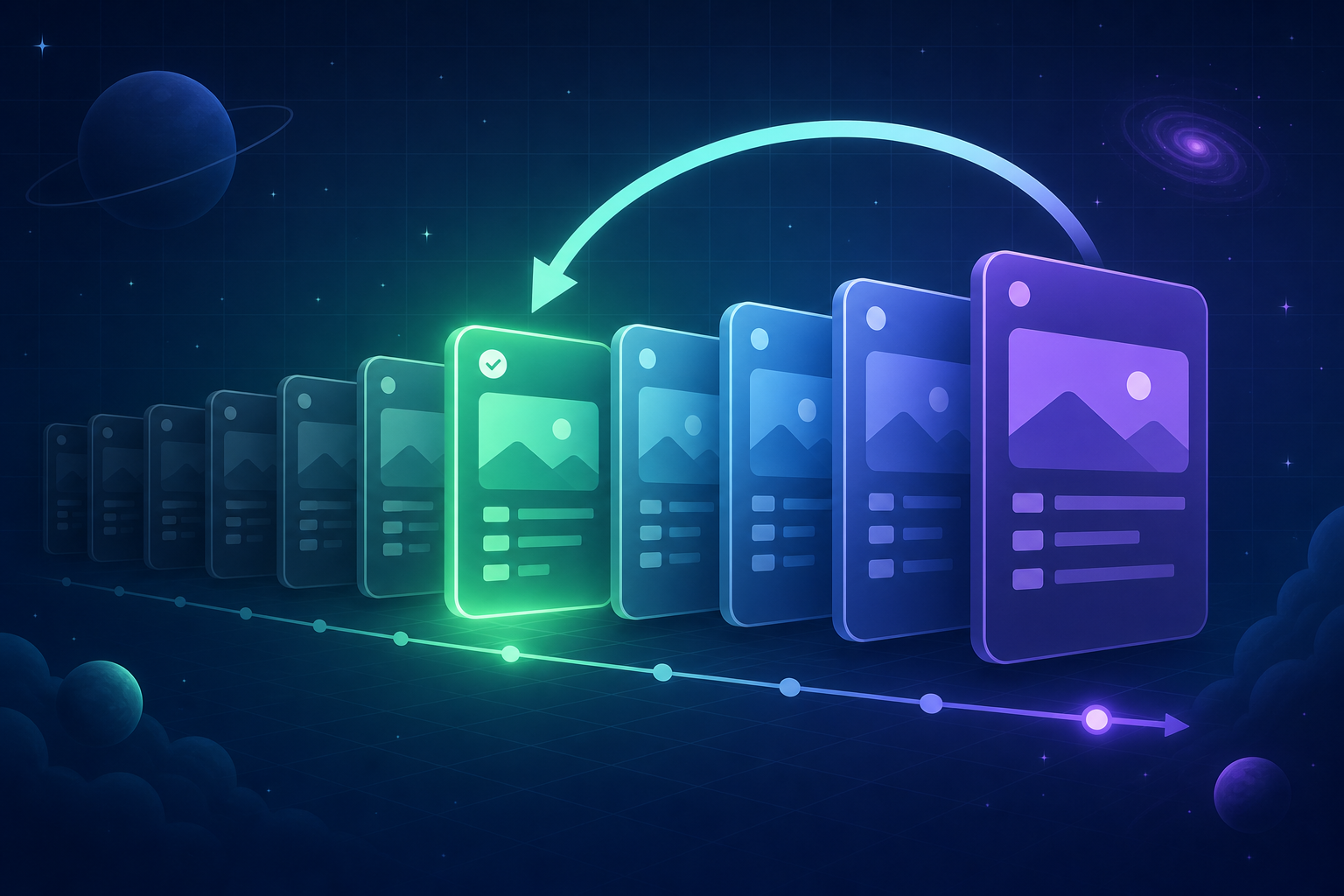
It is 4:55pm on a Friday. Someone merges a change that looked harmless in review, the deploy goes out, and two minutes later the error tracker lights up. At this point, teams split into two categories. The first runs a single command, watches the app revert to the previous release with zero dropped requests, and goes home. The second spends the evening SSH-ing into things, re-deploying old commits by hand, and arguing in Slack about whether the config change or the code change broke it.
The difference between those two teams is not talent. It is whether their platform treats rollback as a first-class operation. Rollback confidence is a shipping-velocity feature: a team that knows it can revert in seconds deploys more often, in smaller pieces, and yes, on Friday afternoons. If you are coming from Heroku, you already know the value of heroku rollback, but you have probably also felt how opaque it is. You run the command and hope. This post walks through exactly what Convox does when a deploy goes bad, both when a human notices and when nobody is watching.
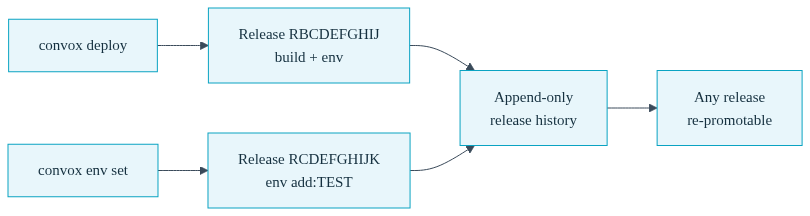
Convox is built on an immutable release model. Every convox deploy produces a new Release: a versioned snapshot that pairs a specific build with a specific set of environment variables. Releases are never edited in place. When something changes, a new release is created, and the old one stays exactly as it was, ready to be promoted again at any time.
Here is what that looks like on a real app:
$ convox releases -a myapp
ID          STATUS  BUILD       CREATED         DESCRIPTION
RCDEFGHIJK  active  BABCDEFGHI  1 minute ago    env add:TEST
RBCDEFGHIJ          BABCDEFGHI  10 minutes ago  build 0a1b2c3d4e commit message
Notice the description on the active release: env add:TEST. That release was not created by a code deploy. It was created by convox env set TEST=hello. This is one of the most underrated parts of the model: environment variable changes create releases too. On many platforms, config drift is invisible; someone changes a variable, the app breaks an hour later, and nobody can reconstruct what happened. On Convox, a config mistake is exactly as visible and exactly as revertible as a code mistake. It has an ID, a timestamp, and a description sitting right there in your release history.
This matters for your deployment rollback strategy because in practice, roughly half of production incidents come from configuration rather than code. A rollback story that only covers code is half a rollback story.
Suppose the release RCDEFGHIJK above is the one causing problems, and you want to get back to RBCDEFGHIJ. The command is:
$ convox releases rollback RBCDEFGHIJ -a myapp
Rolling back to RBCDEFGHIJ...
2026-01-15T14:30:49Z system/k8s/atom/app Status: Running => Pending
2026-01-15T14:30:51Z system/k8s/web Scaled up replica set web-745f845dc to 1
2026-01-15T14:30:51Z system/k8s/web-745f845dc Created pod: web-745f845dc-rzl2q
2026-01-15T14:30:53Z system/k8s/atom/app Status: Pending => Updating
2026-01-15T14:30:55Z system/k8s/web-745f845dc-rzl2q Successfully pulled image
2026-01-15T14:30:56Z system/k8s/web-745f845dc-rzl2q Started container main
OK, RZYXWVUTSR
Two things are worth understanding here. First, the mechanics: a rollback creates a fresh copy of the target release and promotes the copy. Your release history stays intact and strictly append-only. Run convox releases again and you will see a new release at the top, running the old build:
$ convox releases -a myapp
ID          STATUS  BUILD       CREATED         DESCRIPTION
RZYXWVUTSR  active  BABCDEFGHI  1 minute ago    build 0a1b2c3d4e commit message
RCDEFGHIJK          BABCDEFGHI  5 minutes ago   env add:TEST
RBCDEFGHIJ          BABCDEFGHI  15 minutes ago  build 0a1b2c3d4e commit message
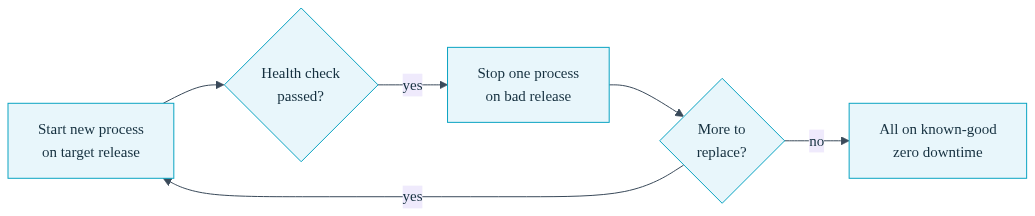
Second, the traffic story. The promotion runs as a rolling update: Convox starts a new process on the target release, waits for it to pass its health check, then stops one process on the bad release, and repeats until everything is running the known-good version. Old processes keep serving requests until their replacements are verified healthy. That is a true zero downtime rollback, not a stop-the-world restart. For a typical web service with a couple of replicas, the whole operation completes in well under a minute, because the image for the old release is already built and usually already cached on your nodes. There is nothing to rebuild and nothing to re-upload.
One honest caveat that applies on every platform: rolling back a release does not roll back your database. If the bad release ran a destructive migration, you need to handle that separately, which is why the practices section at the end of this post exists.
The manual path assumes a human noticed the problem. The more interesting question for a growing team is: what happens at 2am when nobody is looking?
Every Convox release promotion is gated by health checks. As part of the release promotion workflow, each new process must start, bind to its port, and return a healthy HTTP response within its configured window before it receives any traffic. The health check is defined right in your convox.yml:
services:
  web:
    build: .
    port: 3000
    health:
      path: /health
      interval: 5
      grace: 10
      timeout: 3
    deployment:
      minimum: 50
      maximum: 200
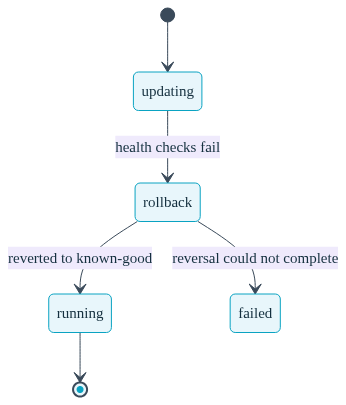
If a new process fails to start, fails to listen on its expected port, or fails its health check during a promotion, Convox does not shrug and route traffic to it anyway. It reverses the rollout. The app's status moves through a well-defined state machine that you can watch in real time:
| App Status | What Is Happening | Console Badge |
|---|---|---|
| updating | A promotion is in progress; new processes are starting and being health-checked | Blue (info) |
| rollback | Health checks failed; Convox is automatically reverting to the previous known-good release | Orange (warning) |
| running | The rollback completed; the app is serving traffic on the previous release | Green (success) |
| failed | The rollback itself failed; manual recovery is needed | Red (danger) |
In the happy-unhappy path, the sequence is updating to rollback to running, and it happens entirely without a human in the loop. Because the rollout is make-one-break-one and respects your deployment minimum and maximum, your existing healthy processes never stopped serving traffic during the failed attempt. The bad code simply never received a request. This is automatic rollback on health checks working as a safety net rather than an alarm.
The rare edge case is rollback to failed, which means the reversal itself could not complete, usually because of a resource constraint or an infrastructure problem rather than your code. Recovery is straightforward: check convox logs and convox deploy-debug to see what is stuck, then promote a known-good release explicitly with convox releases promote RBCDEFGHIJ. Because every prior release is preserved with its build and environment intact, "promote a known-good release" is always an available move. That is the whole point of the model.
During an incident, the worst feeling is not knowing what the platform is doing. Convox gives you several windows into an in-flight recovery.
From the CLI, convox apps info shows the current lifecycle status directly:
$ convox apps info -a myapp
Name        myapp
Status      rollback
Generation  3
Locked      false
Release     RCDEFGHIJK
Meanwhile, convox logs -a myapp streams both your application output and the system events driving the rollout: replica sets scaling up and down, pods being created and terminated, health probes failing with their status codes. Log lines are prefixed with the service and process ID, so you can see exactly which processes belong to the failed release and which belong to the recovery. If you need more forensic detail on why the new release failed, convox deploy-debug -a myapp inspects the failing pods server-side and maps crash loops, image pull errors, and failed readiness probes to plain-language hints, no kubectl required.
In the Console, the app's status badge changes color as the state machine advances, and the Console switches to a faster 5-second polling interval during updating and rollback states so the view stays current when it matters most. Deploy and promote buttons are disabled while a recovery is in flight, which quietly prevents the classic incident-compounding mistake of a second person deploying on top of an in-progress rollback. These app statuses are the same whether you are looking at the CLI or the Console, so your whole team shares one source of truth about what the app is doing.
The platform gives you the mechanism; a few habits make emergency production rollback a non-event instead of a drama.
Keep database migrations backward compatible. The one thing a release rollback cannot undo is a destructive schema change. Adopt the expand-and-contract pattern: add the new column in one release, migrate data and switch code in the next, drop the old column in a third. Every intermediate release remains a safe rollback target. If you need to run a migration deliberately before traffic shifts, use the two-step deploy flow: convox build, then convox run web bin/migrate against the new release, then convox releases promote. The deploying changes guide covers both flows.
Ship small releases. A release containing one change has one suspect when things break. Because Convox makes deploys cheap and rollbacks cheaper, there is no reason to batch a week of work into one risky promotion. Smaller releases also make the release descriptions in convox releases genuinely useful as an incident timeline.
Rehearse on staging. Deploy an intentionally broken health check to a staging app and watch the automatic rollback fire. Then run a manual convox releases rollback and time it. The first time your team sees a rollback should not be during an outage. A pull-request-based review workflow makes this kind of rehearsal nearly free.
One last point for teams evaluating a move off a managed platform: everything described here, the full append-only release history, the health-check-gated promotions, the automatic rollback state machine, runs on infrastructure you can actually see. With a Convox Rack it runs in your own cloud account, and with Cloud Machines it starts at $12 per month with no cloud account required. Either way, you get the exact system events, statuses, and logs behind every deploy and every recovery. That level of transparency is something managed platforms rarely expose, and it is precisely what turns "I hope the rollback worked" into "I watched it work."
The fastest way to build rollback confidence is to run one. If you already have an app on Convox, run convox releases right now and roll back to your previous release; you will be back on the current one two minutes later, having lost nothing. If you are new, the Getting Started Guide walks through deploying a sample app, setting an environment variable to create a second release, and rolling back, all in about fifteen minutes.
Create a free account and ship your first release today. Questions about migrating an existing app? Reach out to our team and we will help you plan the move.


