

It is the first Tuesday of the month. You run terraform plan against production, and you hold your breath. The output scrolls past: a security group rule you do not remember touching is being recreated, the AWS provider wants to bump a minor version, and there are three resources marked for replacement that you are almost certain should not change. You spend the next ninety minutes reading diffs, cross-referencing the AWS console, and trying to remember why the previous version of you wrote a particular module the way they did. Eventually you either apply and pray, or you close the terminal and tell yourself you will deal with it next week.
If you are a solo engineer or a two-person team keeping a scaling startup alive, this ritual is familiar. You did not set out to become an infrastructure maintainer. You inherited some HCL, or you wrote it yourself in a hurry eighteen months ago, and now it is a standing appointment on your calendar that produces nothing your customers can see. This post is about getting that time back without giving up your AWS account, your VPC, or your ability to inspect exactly what is running.
Terraform is a genuinely good tool, and for teams with a dedicated platform group it earns its keep. The problem is not the tool. The problem is the standing cost of operating it safely, and that cost does not scale down for a lean team. It lands on the one or two people who already have the most to do.
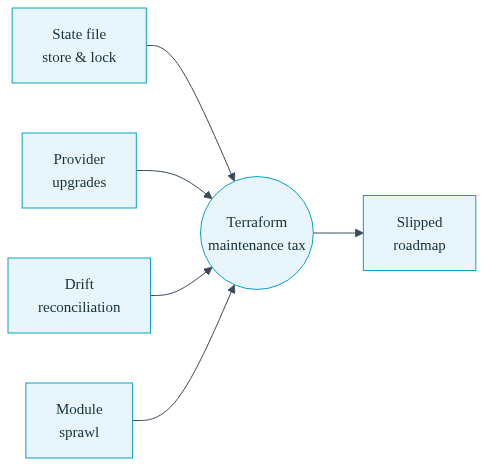
Consider what you actually maintain when you own an infrastructure-as-code setup for a Kubernetes cluster on AWS. There is the state file, which is the source of truth about what exists, and which must be stored remotely, locked during runs, and protected because a corrupted or stale state can wedge your whole cluster. There are provider upgrades, where a bump in the AWS or Kubernetes provider can silently change default behavior, forcing you to read changelogs and test in a staging environment you may not even have. There is drift detection, the ongoing reconciliation between what Terraform believes exists and what AWS actually did after an autoscaler, a console click, or another tool touched a resource.
Then there is module sprawl. What starts as one clean root module becomes a tangle of nested modules, remote module sources pinned to git tags, and variables threaded through four layers of indirection so that changing an instance type means editing a variables.tf, a main.tf, and a module call, then re-running plan to confirm you did not typo the map key. Every one of these is a small tax. Added together, across a month, they are the reason your product roadmap keeps slipping half a sprint.
The expertise required to do all of this safely is real, and it is expertise in a domain that is not your product. That is the trade every lean team is quietly making: hours of specialized infrastructure work in exchange for a cluster that, honestly, does roughly what a well-chosen set of defaults would have done anyway.
Convox Rack takes a different position. It installs into your own AWS account and gives you a real EKS-backed Kubernetes cluster, but it does not hand you a pile of HCL to maintain. Instead it exposes the infrastructure decisions you actually care about as rack parameters. This is infrastructure-as-code abstraction done properly: the declarative intent stays yours, but the imperative machinery that turns that intent into cloud resources is managed for you.
A rack parameter is a named setting that controls a piece of real infrastructure. You view the current values with one command:
$ convox rack params -r rackName
node_disk  20
node_type  t3.small
And you change them with another:
$ convox rack params set node_type=t3.large -r rackName
Updating parameters... OK
That single line is the equivalent of editing an instance-type variable, running plan, reviewing the diff, applying, and watching the node group roll. Convox performs the underlying infrastructure change, rolls the cluster where needed, and returns the rack to a running state. You did not touch a state file. You did not read a provider changelog. You expressed intent, and the platform reconciled reality to match it.
The point is easier to feel with concrete examples, so here are changes a lean team actually makes, and what each one costs you.
Say your staging rack was installed with cost-optimized redundancy and you now want full high availability for production. In a Terraform world this means understanding how your module lays out subnets, NAT gateways, and node group minimums across availability zones, then changing several interlocking values and hoping you got the AZ math right. With Convox it is a parameter:
$ convox rack params set high_availability=true -r rackName
Updating parameters... OK
The high_availability parameter is set at creation time on AWS, so this particular one is chosen when you install the rack, but the mental model holds across the parameters you can change on a running rack: one named setting stands in for a coordinated set of infrastructure decisions you would otherwise have to author and sequence yourself.
Want to move to spot instances to cut your compute bill, but keep a floor of on-demand capacity so a spot reclamation event does not take you fully offline? That is the node_capacity_type parameter combined with the on-demand count controls:
$ convox rack params set node_capacity_type=mixed \
    min_on_demand_count=1 max_on_demand_count=10 -r rackName
Updating parameters... OK
Setting mixed creates one node group with on-demand instances and additional groups using spot instances, and the min and max on-demand counts control the minimum acceptable service availability should every spot instance become unavailable. Expressing this correctly in raw Terraform means understanding mixed instance policies, spot allocation strategies, and how your autoscaler interacts with all of it. Here it is three key-value pairs.
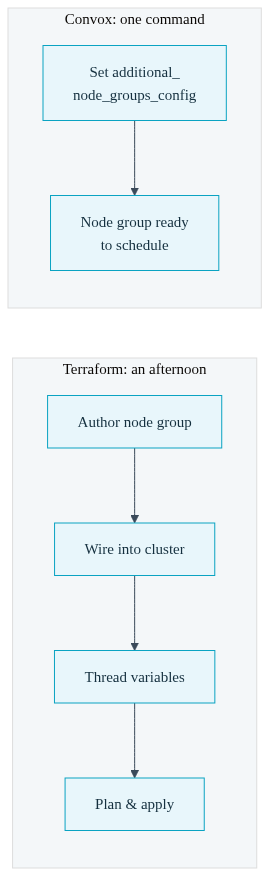
The clearest illustration is adding a whole new node group. Suppose you want to run some cost-optimized ARM workloads on Graviton instances alongside your existing x86 nodes. In Terraform, this is real authoring work: you define a new managed node group resource, wire it into the cluster, set its instance types, size bounds, labels, and taints, thread the variables through your module structure, plan, review, and apply. It is an afternoon if you know your modules well, and a multi-day yak-shave if you do not.
With Convox it is a single parameter carrying a small JSON payload, documented under additional_node_groups_config:
$ convox rack params set additional_node_groups_config='[{"id":1,"type":"t4g.medium","min_size":1,"max_size":3,"label":"arm-workers","dedicated":true}]' -r rackName
Updating parameters... OK
That one command provisions the node group, labels it, and makes it available for scheduling. Once it exists, targeting an app at those nodes is a small addition to your convox.yml:
services:
  web:
    build: .
    port: 3000
    nodeSelectorLabels:
      convox.io/label: arm-workers
If you want native ARM builds too, you pair this with the BuildArch app parameter so builds run on ARM nodes without emulation. The full walkthrough lives in the docs, but the headline is the same: infrastructure work that was an afternoon of HCL authoring is now one command and a two-line manifest change.
A fair question at this point is: the maintenance did not evaporate, so where did it go? The honest answer is that Convox owns the parts you were spending your time on, and you keep the parts that are genuinely yours.
When you set a parameter, Convox applies the underlying infrastructure changes through Terraform and cloud-native resources, updates the internal services, and rolls Kubernetes components as needed. The rack status moves from running to updating and back to running when it is done, and your application containers keep running throughout because these updates are designed for zero downtime. You can watch the whole thing:
$ convox rack logs -r rackNameThe state file, the provider version pinning, the reconciliation logic, and the sequencing of updates all live inside the platform. Drift is a good example of the difference. Convox reconciles rack parameters automatically during version transitions: when a target version does not recognize a parameter, it is removed before the apply runs and a notice is printed so you can see what changed. That is the kind of reconciliation you used to do by hand with terraform plan at the start of this post, and it is now a managed step rather than a monthly appointment.
Here is the trade laid out plainly.
| Concern | Self-Managed Terraform | Convox Rack Parameters |
|---|---|---|
| Change instance type | Edit variables, plan, review diff, apply, watch node group roll | convox rack params set node_type=t3.large |
| Add a node group | Author node group resource, wire into cluster, thread variables, plan, apply | One additional_node_groups_config command |
| State management | You store, lock, and protect remote state | Managed by the platform |
| Provider upgrades | Read changelogs, test defaults, apply carefully | Handled during rack version updates |
| Drift reconciliation | Manual plan-and-inspect cycles | Automatic parameter reconciliation on updates |
| Who owns the AWS account | You | You |
This is the objection that stops most engineers, and it deserves a direct answer. The fear is that a managed abstraction is a black box, that you are trading your AWS console access and your ability to debug for convenience. That is not what is happening here, and the distinction matters.
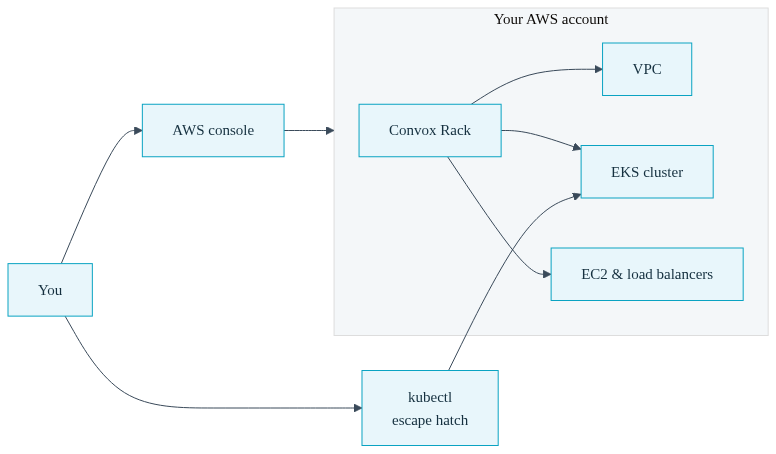
The rack runs in your own AWS account. The VPC is yours. The EC2 instances, the load balancers, the EKS cluster, and every resource the rack provisions live in your account, under your billing, inside your security boundary. You can open the AWS console and look at all of it. This is the whole premise of the bring-your-own-cloud model: you are the owner of record, not a tenant on someone else's infrastructure.
When you genuinely need to drop below the abstraction, you can. Convox provides a Kubernetes API proxy so you can point kubectl straight at your cluster and inspect Kubernetes primitives directly:
$ convox rack kubeconfig -r rackName > $HOME/.kube/rack-config
$ export KUBECONFIG=$HOME/.kube/rack-config
$ kubectl get nodes
The direct Kubernetes access path exists precisely for the edge cases: debugging networking, examining how components tie together, or installing a Kubernetes-native plugin. You are not locked out of the layer you are abstracting over. You are choosing not to babysit it day to day.
So the trade is not control for convenience. The trade is maintenance for time. You keep ownership, keep inspectability, and keep the escape hatch. What you give up is the standing obligation to hand-author and hand-reconcile the infrastructure code that produces a fairly standard cluster. For a lean team, that is the right trade, because the hours you reclaim go back into the product only you can build.
If you are the person running terraform plan every month and wondering whether it has to be this way, the fastest way to answer that is to install a rack and set a parameter yourself. Install into your own AWS account, either through the Convox Console or the command line. Once it is running, try the workflow from this post: check your current parameters, change an instance type, add a node group, and watch the rack reconcile without you touching a state file.
A staging rack is the ideal place to experiment. Set a parameter, run convox rack logs to watch the update, and see how it compares to your current infrastructure ritual. The point of a terraform alternative is not that you never think about infrastructure again. It is that thinking about infrastructure stops being a monthly appointment and becomes a command you run when you actually need something to change.
Ready to stop babysitting HCL and start shipping product? The Getting Started Guide walks through installing a Rack into your own AWS account and setting your first parameters.
Create a free account and install a Rack in minutes, then explore the full rack parameters reference to see everything you can control without writing infrastructure code. For questions about running Convox in a regulated or enterprise environment, reach out to our team.


