

Your deploy script works. Until the day it stops halfway through and you cannot tell which servers got the new code. Maybe one box finished pulling and restarting, the second choked on a bundle install, and the third never got touched at all. Now it is 2am, production is serving two different versions of your app, and the only tool you have to figure out what happened is SSH and a lot of squinting.
If you are the one person who owns deploys, you have lived some version of this. This post is about why a homegrown bash deployment script cannot protect you from that failure mode, and how an atomic release model quietly removes the entire category of problem. We are going to tear apart a realistic deploy script line by line, name every place it can leave you stranded, and then show the single command that replaces the whole thing.
Here is a deploy script that looks familiar. It is not a strawman. Variations of this run in production at thousands of companies right now.
#!/usr/bin/env bash
set -e

SERVERS="web1.example.com web2.example.com web3.example.com"

for host in $SERVERS; do
  echo "Deploying to $host..."
  ssh deploy@$host bash -s << 'EOF'
    cd /var/www/myapp
    git pull origin main
    bundle install --deployment
    bundle exec rails db:migrate
    sudo systemctl restart myapp
EOF
  echo "$host done"
done

echo "Deploy complete"
It is maybe twenty lines. It ships code. It has set -e so it stops on the first error, which feels responsible. And on a good day it works fine. The problem is that "on a good day" is doing an enormous amount of load-bearing work in that sentence. Let us walk through what actually happens on a bad day.
The loop deploys to web1, then web2, then web3, one after another. Each host is updated in place. There is no moment where all three servers flip to the new version together and no moment where they all stay on the old version together. If web2 fails its bundle install, web1 is already running new code and web3 is still running old code. Your fleet is now split-brained, and nothing in the script knows or cares.
This is the core weakness of any in-place deploy: it mutates live servers directly. An atomic deployment has a single commit point where the change either takes effect everywhere or nowhere. A for loop over SSH connections has no commit point at all. It has a series of independent, irreversible mutations that happen to run in sequence.
Suppose web2 fails. Because of set -e, the script exits. Great, it stopped. But what does "stopped" mean for the servers that already changed? web1 is on the new release. There is no instruction anywhere in this script to put web1 back. The git pull already moved the working directory forward. The old dependencies may already be gone. To roll back you would have to SSH in by hand, check out the previous commit, reinstall the old gems, reverse the migration if it ran, and restart. And you have to do that under pressure, at night, while the site is degraded.
Rollback is not a feature you can bolt onto this script cheaply. Real rollback requires that the previous version still exists somewhere intact and can be reactivated instantly. A git pull does the opposite: it destroys the old state by advancing it in place.
Look at what happens after systemctl restart myapp. The script prints "done" and moves to the next host. It never asks whether the app actually came back up. The process could be crash-looping. It could boot, fail to connect to the database, and exit. It could start listening but return a 500 on every request. The script has no idea, because "the restart command returned zero" is not the same thing as "the app is healthy and serving traffic."
This is how you end up promoting broken code to your entire fleet. Each server dutifully restarts into a dead application, the script reports success on every host, and you find out from a customer that the site has been down for twenty minutes. Safe deploy automation has to include deployment health checks that gate the rollout, so that a failing process never advances and never receives traffic. The bash script has no place to put that gate.
Even when nothing errors, in-place deploys accumulate drift. One server had a slightly different gem cached. Another had a leftover file from a previous manual fix someone SSHed in to apply six months ago. A third ran a slightly different Ruby version because it was provisioned later. Because each server manages its own state and you mutate that state directly, the servers slowly diverge. Over time "the fleet" stops being identical machines and becomes three snowflakes that happen to run the same app most of the time. Debugging a problem that reproduces on web2 but not web1 becomes its own forensic project.
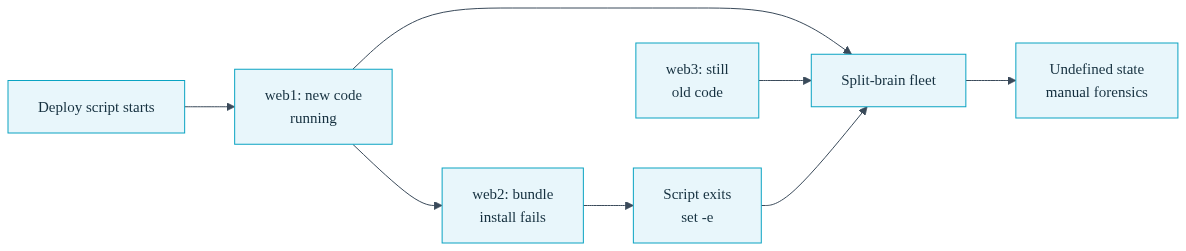
Zoom out from the individual failure points and you find the real issue: when a bash deployment script dies mid-run, it leaves the system in an undefined state. Not a failed state. Not a rolled-back state. An undefined state, where the truth about what is running where lives only in whatever the script happened to have done before it stopped.
Recovering from an undefined state means manual forensics. You SSH into each host. You check the current git SHA. You check whether the migration ran. You check whether the process is up and on which version. You reconstruct, by hand, the story of a script that failed. And every one of those steps is a chance to make it worse. This is the tax you pay for deploy tooling that mutates live state without a commit point, a rollback path, or a health gate. It is not a tax you notice on good days. It is a tax that arrives all at once on the worst day.
Convox is built around a model that makes the undefined state impossible. It has three moving parts, and the separation between them is the whole point.
First, convox build produces an immutable build. It packages your source, builds a container image from your Dockerfile, and stores it. That image never changes. It is a fixed artifact with an ID.

Second, a release bundles that build together with your environment variables. A release is also immutable. It is a snapshot: this exact image, plus this exact configuration, at this exact moment.
Third, convox releases promote (or convox deploy, which builds and promotes in one step) rolls that release out. And this is where the atomicity lives. A promotion either fully succeeds and the new release is active everywhere, or it fails its health checks and the app is automatically returned to the previous release. There is no third outcome. There is no half-deployed fleet.
The reason rollback is instant and reliable is that the previous release still exists, fully intact, as its own immutable artifact. Nothing about promoting a new release destroys the old one. Compare that to git pull, which advances your working directory in place and leaves you nothing clean to fall back to. With immutable builds, "roll back" is not a reconstruction job. It is just pointing at a release that was never touched.
Because the model is atomic, the app has a visible, well-defined status at every moment. When you promote, the app moves from running to updating. If health checks fail during the rollout, it moves to rollback and returns to the last known-good release, then back to running. You are never guessing. The app status tells you exactly where you are in the lifecycle, and the Console polls faster during updating and rollback so you see the transition in near real time. That is the opposite of the bash script, where the only status is whatever you can infer from three SSH sessions.
The health gate that the bash script had no place for is a first-class part of a Convox service. You declare it in convox.yml:
services:
  web:
    build: .
    port: 3000
    health:
      path: /health
      interval: 5
      timeout: 3
      grace: 10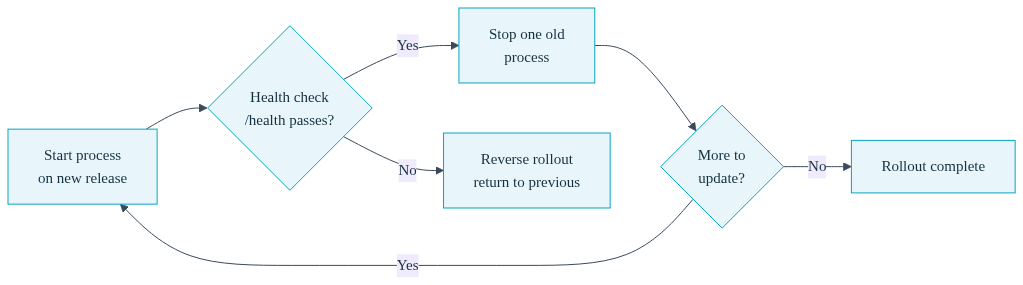
The path is the endpoint the load balancer hits to decide whether a process is ready to serve requests. The interval is how often it checks, the timeout is how long it waits for a valid response, and the grace is how long it gives the process to boot before it starts checking. A process that fails its health checks is never given traffic. See the full health checks reference for liveness and startup probes on top of this readiness check.
Here is why that matters for a promotion. During a rolling update, Convox starts a process on the new release, verifies it passes the health check, and only then stops a process on the old release. It repeats until the whole service is on the new code. If a new process fails to start or fails its health check, the rollout reverses and every process is returned to the previous release. Your broken code never receives a single production request, and you never have to manually undo anything.
The rollout respects deployment.minimum and deployment.maximum so the service stays available the entire time:
services:
  web:
    build: .
    port: 3000
    health:
      path: /health
    deployment:
      minimum: 50
      maximum: 200
A minimum of 50 means at least half your capacity stays healthy and serving throughout the deploy. A maximum of 200 means Convox can run up to double your normal process count during the transition to bring new capacity online before retiring the old. The "make one, break one" rollout the bash for-loop was faking gets done correctly, with a health gate at every step.
Here is the direct comparison of what each approach gives you at each stage of a deploy.
| Concern | Custom Bash Script | convox deploy |
|---|---|---|
| Atomicity | In-place mutation per server, no commit point | Immutable release, promotion fully succeeds or fully rolls back |
| Rollback | Manual SSH forensics, old state destroyed by git pull | Automatic on health failure, previous release always intact |
| Health gating | None, "restart returned zero" treated as success | Health check gates every step of the rollout |
| Partial failure | Leaves fleet in undefined split-brain state | No undefined state, service stays live via minimum capacity |
| Visibility | Inferred from three SSH sessions | Explicit updating and rollback statuses |
| What you run | ~80 lines of ssh, git, bundle, restart | convox deploy -a myapp |
The entire deploy is one command:
$ convox deploy -a myapp
Packaging source... OK
Uploading source... OK
Starting build... OK
Build:   BABCDEFGHI
Release: RBCDEFGHIJ
Promoting RBCDEFGHIJ...
Status: Running => Pending
Status: Pending => Updating
Status: Updating => Running
OK
That single command builds the image, creates the release, promotes it with a health-gated rolling update, and rolls back automatically if the new code fails to come up healthy. It does what the eighty lines of bash were trying to do, and it does the parts the bash could not do at all. If you want to inspect the new release before it goes live, you can split it into two steps with convox build followed by convox releases promote, which is useful when you want to run a migration against the new build before sending it traffic.
Deploys still fail sometimes. The difference is what failure looks like. With the bash script, a failure leaves you with an undefined fleet and a flashlight. With Convox, a failed promotion has already rolled itself back, so production is safe, and you get a purpose-built tool to find out why.
$ convox deploy-debug -a myappconvox deploy-debug inspects the failing processes and tells you in plain language what went wrong: a crash loop on startup, an image pull failure, an out-of-memory kill, a config error from a missing environment variable, or a health check that never passed. It collects the pre-healthcheck logs that convox logs cannot show you, because those logs only exist on a pod that never became ready. This is the forensics work you used to do by hand across three SSH sessions, done for you and mapped to an actionable hint. And it runs without kubectl or any cluster credentials.
If you do need to move an app back to an earlier release deliberately, that is one command too. convox releases rollback copies a prior release and promotes it, and because every release is immutable, the target is exactly as it was when you shipped it. There is no reconstructing old state. It was never gone. See the rollbacks guide for the full flow.
The point of moving off your deploy script is not to hand your infrastructure to a black box. Convox runs on your own cloud account, on standard Kubernetes, and you keep your AWS knowledge exactly as relevant as it was. What you give up is the toil: the 2am forensics, the split-brain fleets, the manual rollbacks, the babysitting of a script that treats "the restart command exited zero" as good enough. Your deploy.sh was the single point of failure and the thing only you understood. Replacing it with a documented, health-gated, atomic model is how you stop being that single point of failure, and how you finally take a vacation without carrying the deploy logic around in your head.
The deployment reliability you have been trying to hand-roll with set -e and hope is not something you can build cheaply in bash. It comes from the model: immutable builds, atomic releases, and health checks that gate every step. Get that model and the entire category of half-finished 2am deploys goes away.
Ready to retire your deploy script? The Getting Started Guide walks through installing a Rack in your own cloud account and running your first health-gated deploy in minutes.
Create a free account and deploy your first app with a single command. Have questions about migrating an existing setup? Reach out to our team and we will help you map your current deploy flow onto the atomic release model.


