
The security questionnaire from your biggest prospect has a question your current platform cannot answer well: whose cloud account does our data live in, and can we audit it? Until you have a better answer than "our hosting provider manages that", the deal does not move. For a company between $2M and $50M ARR, a single stalled enterprise contract is usually the most expensive infrastructure problem on the books, and it is sitting in your pipeline right now where you can price it yourself.
The reflexive fix is the one you have been avoiding: rebuild on raw AWS with Terraform and EKS, which means hiring the platform engineer you deliberately did not hire when you chose a managed PaaS in the first place. This post argues there is a middle path. You keep the deploy workflow your team already has, move the runtime into an AWS account your company owns, and answer the review's residency and IAM questions directly instead of forwarding them to a vendor. The technical work is smaller than you think, and the rest of this post shows exactly what it looks like.
Managed platforms like Render earn their place by removing infrastructure work. Your team pushes code, the platform builds and runs it, and nobody maintains a Kubernetes cluster. For a team with zero or one ops staff, that trade made sense on day one and probably still makes sense for most of what you run.
The model has one structural property that becomes a problem the day an enterprise buyer sends a security review: your workloads run in infrastructure the platform vendor operates, not in a cloud account you control. That is not a flaw in the product. It is the definition of the product. But it means that when a reviewer asks about data residency commitments, IAM policy, network boundaries, or audit log access, the honest answer is "that is handled by our hosting provider, here is their documentation." Some reviewers accept that answer. The ones attached to your largest deals increasingly do not, because their own compliance obligations require them to trace exactly where their data sits and who can touch it.
So the search for Render alternatives at this company size is rarely about features or price. It is triggered by a specific document from a specific prospect, and the evaluation criterion is narrow: can the new platform answer the questions the current one structurally cannot, without costing us the lean-team economics that made us pick a PaaS at all?
If you have closed the infrastructure section of a vendor questionnaire recently, the questions cluster into four areas. It is worth being precise about them, because they define what any alternative has to deliver.
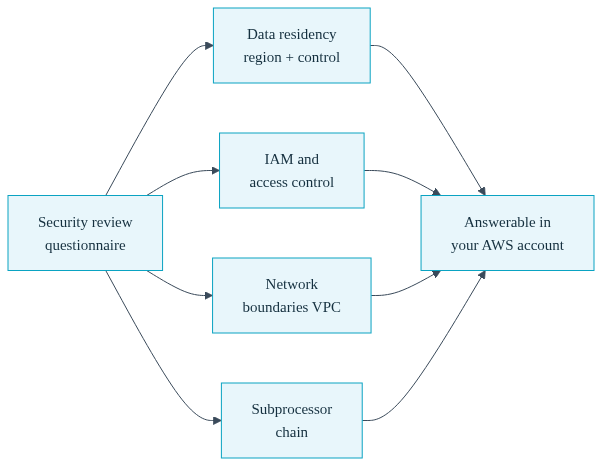
Data residency. The reviewer wants to know which cloud provider, which region, and under whose contractual control the data sits. On a third-party-hosted PaaS, you can state the region, but the account relationship belongs to the vendor, so the residency commitment is theirs to make and change. When the workload runs in your own AWS account, the region is one you chose, the commitment is yours to give, and it survives any change in your tooling vendors.
IAM and access control. Reviewers ask who can access production, how access is granted and revoked, and whether privileged actions are logged. When the runtime is in your AWS account, the answer is your own IAM policies and your own CloudTrail, which your security contact can inspect directly. When the runtime is in a vendor's account, you are describing the vendor's internal access controls, which you can reference but not audit yourself.
Network boundaries. Questions about VPC isolation, private subnets, ingress and egress control, and peering with the customer's own systems are easy when there is a VPC you own and can diagram. A Convox Rack on AWS provisions a dedicated VPC in your account with configurable CIDR ranges, private subnets, and network parameters you set yourself through documented rack parameters, which means the network diagram in your questionnaire response describes infrastructure you actually control.
The subprocessor chain. Every vendor between your customer's data and the hardware adds a line to your subprocessor list and a dependency in your compliance story. A managed PaaS sits in that chain as a data processor. When the platform layer is tooling that deploys into your account rather than hosting that holds your data, the chain shortens to you and your cloud provider, and the questionnaire gets simpler to complete and simpler to defend.
The category you are looking for is bring-your-own-cloud, or BYOC: a platform that gives you the PaaS workflow, git-driven deploys, managed releases, one-command rollbacks, while the compute, the data, and the network live in a cloud account registered to your company. Convox Rack is built on exactly this model. A Rack is a complete platform environment, Kubernetes underneath, that installs into your own AWS account. It also installs on GCP, Azure, and DigitalOcean, but for a team facing an enterprise security review, AWS is usually where the conversation lands because that is the account structure the reviewer already knows how to evaluate.
The security review implications follow directly from the architecture. Because the Rack runs in your account, your AWS BAA covers it if you handle regulated health data, your CloudTrail records it, your IAM policies gate it, and your VPC bounds it. Convox is compliance ready in the precise sense: it inherits the controls of the AWS account you already operate, rather than asking a reviewer to trust a second company's controls. It is not a certification you buy; it is a structure where the certifications and agreements that matter, like SOC 2 evidence collection and HIPAA BAAs, are between you and AWS directly.
The money changes shape too. On a self-hosted Rack, AWS bills you directly for the infrastructure at AWS prices, and Convox adds no markup on that infrastructure. You pay Convox for the platform layer and AWS for the compute, which means your infrastructure spend becomes a line item you can optimize with the levers AWS gives account owners, and a line item a procurement reviewer can trace cleanly.
If you are evaluating this category seriously, the feature-level details matter, and we keep a direct Convox vs Render comparison current for exactly this evaluation. Teams running the same sweep often have Railway on the shortlist as well, which shares Render's third-party-hosted model and therefore shares the same structural answer to the residency question; the Convox vs Railway comparison covers that side. For the broader three-way read beyond the security-review trigger, see Render vs Railway vs Convox. This post stays focused on the question that started your search: passing the review.
The reason "move to raw AWS" feels like a trap is that it usually means EKS, Terraform modules, ingress controllers, certificate management, and IAM wiring, each of which is a real discipline. That is a platform engineer's job description, and at your headcount that hire competes directly with product engineers. The entire point of a Rack is that the platform layer is automated, so deploying Docker to AWS stops requiring the team you do not have.

Here is the actual sequence, with nothing elided. First, the Rack installs into your AWS account. The documented install takes roughly 10 to 20 minutes, and the recommended path is through the Convox Console, which also handles Terraform state and team access so a one-person ops function is not a single point of failure. The AWS installation guide covers the CLI path if you prefer it. When it finishes, you verify with one command:
$ convox rack
Name      production
Provider  aws
Router    router.0a1b2c3d4e5f.convox.cloud
Status    running
Second, you translate your service definitions. Convox publishes a Render migration guide that maps render.yaml concepts onto convox.yml field by field: a web service with a port becomes a service with a port, a background worker becomes a service without one, a cron job becomes a timer, and a managed Postgres becomes a declared resource that injects its connection string automatically. A typical result looks like this:
environment:
  - SECRET_KEY_BASE
  - RAILS_ENV=production
resources:
  database:
    type: postgres
services:
  web:
    build: .
    port: 3000
    health: /healthz
    resources:
      - database
    scale:
      count: 2-6
      targets:
        cpu: 70
  worker:
    build: .
    command: bin/worker
    resources:
      - database
timers:
  nightly-cleanup:
    schedule: "0 3 * * *"
    command: bin/cleanup
    service: worker
One honest note the migration guide also makes: Convox builds from a Dockerfile. If your Render services used a native runtime with a build command rather than Docker, you write a Dockerfile first. For a team already deploying containers, this step is zero work; for others it is a bounded, one-time task per service, and the Dockerfile guide plus the example apps cover the common frameworks.
Third, the daily workflow, which is the part your developers will judge. Secrets are set per app and never live in the repo:
$ convox env set SECRET_KEY_BASE=... -a myapp
$ convox deploy -a myapp
A deploy builds the image, creates a release, and promotes it as a rolling update that automatically reverses if health checks fail. Rolling back to a previous release is a single command. The full build and promote flow is documented in Deploying Changes. This is the part of the argument that matters for a lean team: the security posture changed completely, the account ownership changed completely, and the thing your three developers type every day barely changed at all. When you are ready to cut traffic over, you validate against the Rack-assigned hostname first and move DNS last, so the old platform remains your rollback until you choose to decommission it.
A post that pretends this move is free would deserve your skepticism, so here is the ledger. When you own the AWS account, you own the AWS bill, which is now metered usage rather than a flat platform invoice, and someone on your team needs to glance at it monthly. You own account hygiene: root credentials, billing alerts, and the IAM users or roles your team authenticates with. And you own keeping the Rack current, which in practice means running documented rack updates on a cadence, stepping through minor versions in order, ideally against a staging Rack first. Convox automates the platform layer, provisioning, rolling updates, certificate issuance through Let's Encrypt, load balancing, and log plumbing, but the account the platform runs in is yours, and that is precisely the property the security review is paying you for.

What you get for carrying that is the other side of the ledger. Infrastructure is billed by AWS at AWS prices with no Convox markup on it, which applies to self-hosted Racks specifically. The questionnaire answers that were previously forwarded to a vendor become direct statements about infrastructure you control. And the ceiling on your compliance roadmap rises: workloads that need HIPAA handling or deployment into AWS GovCloud regions become possible on the same platform, because the controls are inherited from the account rather than from a hosting vendor.
The comparison in budget-owner terms is not "Render versus Convox". It is "Convox Rack versus the platform hire". The raw-AWS path converts a stalled deal into a recruiting problem that takes months to solve and a salary that recurs forever. The BYOC path converts it into a 10 to 20 minute install, a manifest translation you can scope by counting your services in render.yaml, and an ongoing operational load that one engineer carries as a slice of their week rather than as a job title.
Because account ownership determines who controls IAM, audit logs, network boundaries, and data residency. A reviewer can evaluate controls you own directly; controls owned by your hosting vendor can only be referenced, not audited by you, and they add a subprocessor to the customer's own compliance chain.
Yes. Convox Rack installs into your AWS account and gives you a PaaS workflow on top of it: convox deploy builds and promotes releases, convox env set manages secrets, and rollbacks are one command. The published Render migration guide maps render.yaml services, workers, cron jobs, and databases onto convox.yml equivalents.
The documented install takes roughly 10 to 20 minutes while the cluster provisions in your account. The recommended path is the Convox Console, which manages Terraform state and team access; a CLI install is also documented. You verify the result with convox rack, which reports the Rack status and router endpoint.
You do, directly to AWS, at AWS prices. Convox adds no markup on that infrastructure for self-hosted Racks; you pay Convox separately for the platform. This gives you a traceable cost structure and direct access to AWS account-owner pricing levers, at the cost of owning a metered bill someone must watch.
It helps structurally. Running in your own AWS account means AWS-inherited controls, your own CloudTrail, and a BAA signed with AWS directly apply to your workloads. Convox is compliance ready through this architecture, not certified on your behalf; your organization still owns its own audit and compliance program.
Here is the decision-shaped next step. Pull the infrastructure section of the last security questionnaire that stalled, and mark every question whose answer improves when the runtime sits in an AWS account you own: residency, IAM, audit logs, network boundaries, subprocessors. If more than a few improve, pilot one non-critical service: install a Rack, translate its render.yaml entry using the Render migration guide, and run it against the Rack hostname while your current platform keeps serving production.
Start with the Convox vs Render comparison to size the evaluation, then create a free account to install your first Rack. If the stalled deal involves HIPAA or GovCloud requirements, talk to our team about the compliance architecture before you scope the pilot.


