
Your team is three tabs deep into GPU vendor pricing pages. One tab promises per-second billing, another promises the lowest hourly rate on the internet, and the third is a spreadsheet trying to reconcile the two. Meanwhile, your CFO has a simpler question: why does the AI feature need yet another vendor, another invoice, another security review, and another platform your one ops engineer has to learn?
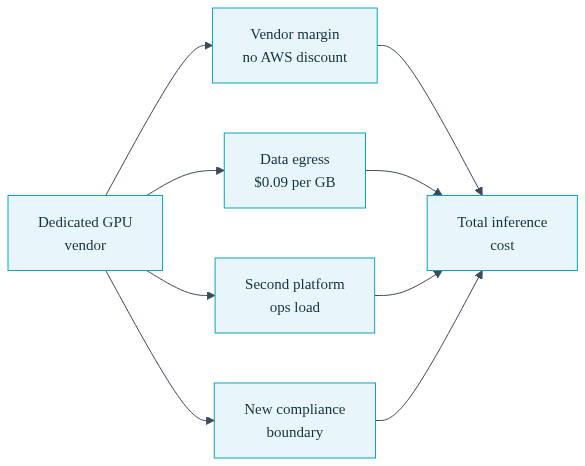
That question deserves a better answer than "the GPUs were cheaper there." Because for a company that already runs on AWS, often with negotiated discounts or committed spend, the hourly sticker price on a GPU vendor's website is the smallest number in the comparison. The real cost includes the vendor's margin on compute, data egress out of AWS at documented rates, a second compliance boundary, and the ongoing operational tax of a second platform. This post walks through each of those layers with arithmetic you can redo yourself, then shows the mechanism Convox provides to run inference on GPU capacity in your own AWS account, with guardrails that make sure the spend cannot silently run away.
One scope note up front, because accuracy matters more than enthusiasm: everything in this post about GPU scheduling, fractional GPUs, GPU scale to zero, and GPU budget caps applies to Convox Racks on AWS only. If your infrastructure lives on GCP, Azure, or DigitalOcean, these specific features are not available there today.
When an engineering leader searches for a cheap GPU cloud, what they actually want is a low total cost of running inference. Those are not the same thing, and the gap between them is where budgets quietly leak.
Start with the obvious layer: a dedicated GPU vendor is a business, and its hourly rate includes its margin. That is fair and normal. But it means you are paying a middleman for compute that AWS also sells, and if you already hold Savings Plans, Reserved Instances, or an Enterprise Discount Program agreement with AWS, none of that negotiated discount applies to the second vendor's bill. Every dollar of committed spend you fail to consume on AWS while paying list price elsewhere is a dollar spent twice.
The second layer is data movement. Your application data, your vector store, your user requests all live inside your AWS VPC. A GPU vendor outside AWS means traffic crosses the boundary in both directions, and AWS charges for the outbound leg. AWS's public list price for data transfer out to the internet starts at $0.09 per GB for the first 10 TB per month in us-east-1. As a labelled illustration you can redo: a workload that ships 2 TB of request payloads, embeddings, or model context out of AWS each month pays roughly 2,048 GB x $0.09, which is about $184 per month in egress alone, before the GPU vendor has billed you a cent. That line item never appears on the GPU vendor's pricing page because it lands on your AWS invoice instead.
The third layer is the one budget owners feel most: operational load. A second platform means a second set of credentials to manage, a second deployment pipeline, a second monitoring stack, and a second vendor security review for your next enterprise customer questionnaire. If you have one ops engineer, or none, each of those is measured in engineer days that do not ship product. For a team already stretched across its platform engineering tools, adding a whole new platform for one workload is rarely the cheap option, whatever the hourly rate says.
And the fourth layer is the compliance boundary. Inference traffic often carries exactly the data your auditors care about. Keeping it inside the VPC and the AWS account you already govern means your existing controls, IAM policies, and audit evidence cover it. Moving it to a new vendor means extending that boundary, which is a project, not a checkbox.
| Cost layer | Dedicated GPU vendor | Inference in your own AWS account |
|---|---|---|
| Compute pricing | Vendor list price, including vendor margin; your AWS discounts do not apply | Your account's rates, including spot, Savings Plans, and EDP discounts you already negotiated |
| Data egress | Outbound AWS transfer at $0.09/GB list price (first 10 TB/month tier) on every request path that leaves the VPC | Traffic stays inside your VPC |
| Security review | New vendor assessment, new data processing terms, new boundary to document | Inherits the controls and audit evidence of the AWS account you already govern |
| Ops load | Second platform, second pipeline, second monitoring stack for a one-person ops team | Same deploy workflow as the rest of your services |
Here is the reframe: for most mid market teams with an inference workload and an existing AWS relationship, the cheapest GPU cloud is not a cloud at all. It is GPU instances scheduled inside the account whose invoice you already negotiate, consumed only while inference actually needs them.
This is the model Convox supports for AI workloads on AWS. A Convox Rack is a Kubernetes-based platform that installs into your own AWS account. Your services, including GPU-backed inference services, run on EC2 instances you pay AWS for directly, at whatever rates your account carries. Because the infrastructure stays in your account, Convox adds no markup on it; the GPU line on your bill is AWS's price, not a reseller's.
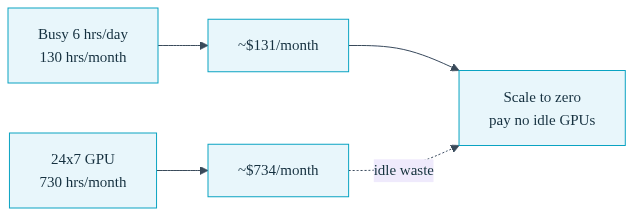
The economics get interesting because of how the capacity is provisioned. A worked illustration using public AWS list prices in us-east-1: a g5.xlarge (one NVIDIA A10G) runs about $1.006 per hour on demand. Run it around the clock and that is roughly 730 hours x $1.006, or about $734 per month. But an internal inference feature that is busy six hours per working day needs something closer to 130 hours per month, which at the same rate is about $131. The difference between those two numbers is not a discount anyone gave you. It is simply not paying for idle GPUs, which is exactly what on-demand node provisioning and scale to zero are for. Rerun that arithmetic with your own instance family and your own duty cycle; the shape of the result holds.
Layer your existing discounts on top. Spot capacity for GPU instance families, Savings Plans you have already committed to, an EDP percentage your finance team negotiated: all of it applies, because the instances are yours. A second vendor resets all of that to zero.
The mechanism is deliberately boring, which is the point for a team without a platform group. You declare what a service needs in convox.yml, including its GPU requirement via the scale.gpu block:
services:
  inference:
    build: .
    port: 8000
    scale:
      count: 1
      cpu: 2000
      memory: 8192
      gpu:
        count: 1
With Karpenter enabled on the Rack (karpenter_enabled=true), AWS GPU instance families are added to the provisioning pool, and GPU nodes are created on demand when a pod that declares a GPU needs to schedule, then removed when nothing needs them. You do not pre-buy a GPU fleet or hand-manage node groups; the Rack handles architecture selection (via parameters like karpenter_arch) and node pool configuration, and the practical prerequisites are documented, such as a node disk of at least 100 GB for large model images. For scale to zero specifically, GPU utilization and queue depth autoscale triggers (which require keda_enable=true) can take a service's minimum replica count to zero so the GPU node itself goes away between bursts. On AWS Racks this extends to fractional GPU allocation for services that do not need a whole card.
The deploy workflow is the one your team already uses for everything else: convox deploy, environment variables with convox env set, rollbacks with convox releases rollback. There is no second pipeline to build and no second set of platform engineering tools for your ops engineer to learn. If you are standing up a model rather than migrating an existing service, the Console's Model Deploy Wizard runs a GPU readiness check against your Rack and walks through node provisioning options before anything deploys.
For a full implementation walkthrough, from Rack parameters through serving frameworks, see the AI infrastructure and ML deployment guide.
The fear behind every GPU conversation with a CFO is the runaway bill: a node that never scaled down, an experiment nobody turned off. The honest answer to that fear is not a cheaper hourly rate. It is enforcement. On AWS Racks, Convox ships a guardrail stack that turns "we will keep an eye on it" into configuration.

First, turn on cost tracking, which accumulates per-app, per-service spend estimates from AWS list prices and pod resource requests every ten minutes:
$ convox rack params set cost_tracking_enable=trueThen put a hard ceiling on the inference app with a budget cap. The cap can alert, block new deploys, or scale eligible services to zero when spend crosses the line:
$ convox budget set myapp --monthly-cap 500 --at-cap-action auto-shutdown
$ convox budget simulate-shutdown myapp
The simulate-shutdown command previews exactly which services would be scaled to zero and in what order, without touching anything, so you can rehearse the worst case before it happens. And because Convox's cost estimates are built from AWS list prices while your account may carry negotiated discounts, the --pricing-adjustment flag lets you align reported spend with what finance actually sees; a team with a 30 percent committed-use discount would set --pricing-adjustment 0.7 so the cap trips against real dollars, not list-price dollars.
The evidence layer underneath all of this is GPU observability. Enabling it is two Rack parameters on AWS, where the NVIDIA device plugin is the AWS-side prerequisite for pod-to-GPU attribution:
$ convox rack params set gpu_observability_enable=true nvidia_device_plugin_enable=trueThat installs NVIDIA's DCGM exporter on GPU nodes and feeds the Console's GPU dashboard: utilization, memory, tensor core activity, and power draw per service and per pod. When your CFO asks whether the instance family is right-sized, you answer with a utilization chart instead of a hunch. For teams putting an LLM API specifically into production, the GPU LLM API production deployment guide covers this stack end to end.
Running GPUs in your own account is not free of trade-offs, and pretending otherwise would undercut the argument. Two situations genuinely favor a dedicated vendor. First, scarce top-end hardware: if your workload needs the newest flagship accelerators and your AWS region has limited availability or long quota lead times, a vendor whose business is stockpiling that hardware may simply be able to hand you capacity sooner. Second, truly bursty workloads with no baseline at all, where even on-demand provisioning in your own account carries more coordination than the workload justifies.
Owning the capacity also means owning the responsibilities that come with it. Your team files the AWS service quota increases for GPU instance families, and your team decides whether the workload belongs on a g4dn, a g5, or something larger. Convox reduces that work, the Model Deploy Wizard's readiness check verifies device plugin status, provisioning configuration, and node disk sizing before you deploy, and the wizard estimates VRAM requirements for a given model, but it does not remove the quota request from your to-do list. For most inference workloads with any steady baseline, that is a reasonable price for keeping compute inside your discounts, your VPC, and your compliance boundary. For the two cases above, it may not be.
It depends on your AWS relationship and duty cycle, so price it rather than assume it. If you hold Savings Plans or negotiated discounts and your workload has any steady baseline, your own account often wins once you add cross-vendor egress at AWS's $0.09/GB list rate and the ops cost of a second platform. Multiply your projected inference hours by your account's GPU rate and compare.
Yes, on AWS Racks. GPU utilization and queue depth autoscale triggers, which require KEDA to be enabled on the Rack, can take a service's minimum replica count to zero so Karpenter removes the GPU node between bursts. Separately, budget caps with the auto-shutdown action scale eligible services to zero when monthly spend crosses the cap you set.
The GPU features discussed here, including fractional GPUs, GPU scale to zero, GPU budget caps, and the Console GPU dashboard, are available on Convox Racks running in AWS only. If your workloads run on GCP, Azure, or DigitalOcean Racks, these specific GPU capabilities are not available there today, so plan GPU inference on an AWS Rack.
Enable cost tracking with convox rack params set cost_tracking_enable=true, then set a cap: convox budget set myapp --monthly-cap 500 --at-cap-action auto-shutdown. When spend reaches the cap, eligible services scale to zero after a countdown. Use convox budget simulate-shutdown myapp to preview exactly which services would stop before a real cap fire ever happens.
No. You declare GPU needs in convox.yml with the scale.gpu block and deploy with convox deploy; Convox manages the EKS cluster and Karpenter provisioning underneath. Your team still owns AWS-side tasks like GPU quota requests and instance family choices, and the Model Deploy Wizard's readiness check guides that setup.
The decision-shaped next step is arithmetic, not a platform migration. Pull your current or projected inference hours, price them at your AWS account's GPU rates, including any spot or committed-use discounts you hold, and set that number next to the GPU vendor quote plus the egress your traffic would incur. Then pilot one inference service on a Rack in your own account with a budget cap set from day one, so the experiment cannot cost more than you decided it should. The Getting Started Guide covers Rack installation and your first deploy.
Create a free Convox account and install a Rack into your AWS account. Questions about GPU workloads, pricing mechanics, or compliance boundaries? Talk to our team.


