
Your product team wants the AI feature live this quarter. An LLM summarizing clinical notes, an imaging model flagging anomalies, a triage assistant: whatever it is, it needs GPUs, and the roadmap has a date on it. Meanwhile your compliance officer has one request that sounds simple and is not: keep the vendor list exactly as long as it is today.
Those two goals collide the moment someone proposes a managed GPU inference API. Every new vendor that touches protected health information costs you a vendor-risk review, a security questionnaire, a BAA negotiation, and legal hours, and in a regulated organization that cycle is measured in months, not sprints. The feature does not slip because the model is hard. It slips because procurement is.
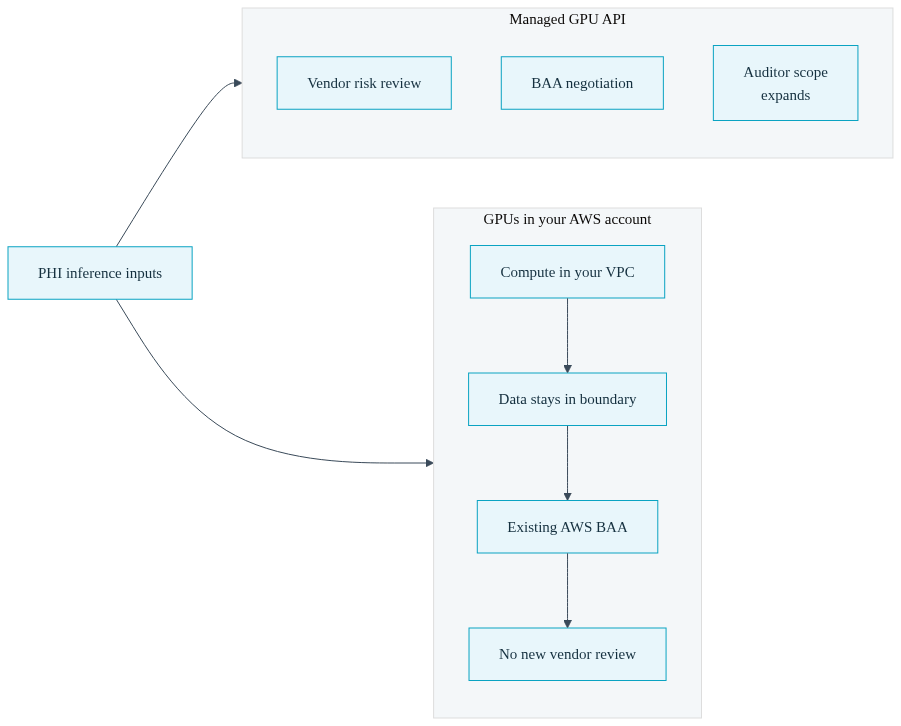
There is a version of this decision where the collision never happens: run the GPU inference workload on EC2 instances inside the AWS account you already operate under an existing AWS BAA. No new infrastructure vendor enters the PHI data path, so there is no new vendor review to run. This post makes that argument first, then walks through exactly how to do it with a Convox Rack, including the configuration, the telemetry, and the spend controls your next audit will ask about. It also names, honestly, who should not choose this path.
In most industries, picking where your GPUs live is a cost and performance question. In healthcare it is a data governance question before it is anything else, because the inputs to an inference service are often PHI: clinical notes, imaging studies, lab values, patient messages. The moment those inputs transit infrastructure owned by a new company, that company is in your compliance scope. Your auditor will ask where the data went, your compliance officer will ask who can touch it, and your legal team will ask who signed what.
That is why a managed inference API that would take an afternoon to integrate at a B2B SaaS company takes a quarter at a healthcare company. The integration is not the work. The work is the vendor risk assessment, the review of the vendor's own attestations, the BAA negotiation with a company whose standard terms were not written for your situation, and the internal documentation explaining to your auditor why this vendor is now an in-scope system. Multiply that by every experiment the product team wants to run, and GPU vendor sprawl becomes a standing tax on your ability to ship.
Keeping the GPUs inside your own AWS account collapses that entire cycle. The compute runs in your VPC. The data never leaves the account boundary. The logs land in your CloudWatch. The audit controls you already documented for the rest of your AWS workloads, IAM, encryption, network isolation, logging, apply to the inference service the same way they apply to your application servers, because it is the same account under the same AWS BAA you already signed. When the compliance review happens, the answer to "what new vendors touch PHI for this feature" is: none. To be precise about the posture: this is compliance readiness through inherited controls, not a certification anyone hands you. Convox is not itself HIPAA certified and does not sign your BAA; AWS does, and you already have that agreement in place. What changes is that your GPU hosting decision stops creating new compliance surface area.
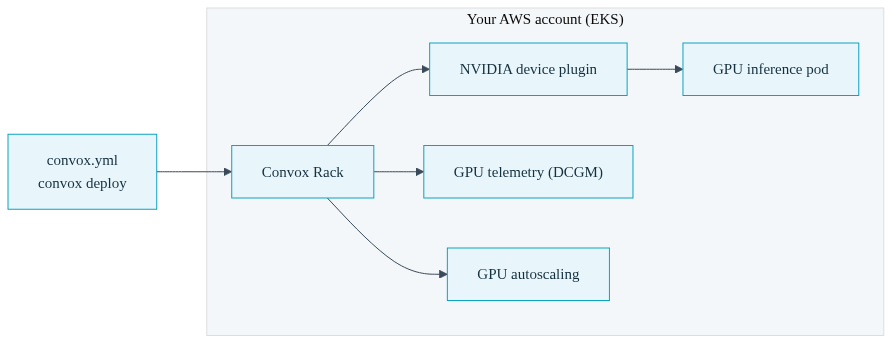
The obvious objection is that running your own GPU infrastructure means building a platform team to babysit Kubernetes, GPU drivers, device plugins, and node provisioning. That is the gap Convox closes. A Convox Rack is a complete deployment platform that installs into your own AWS account: it provisions an EKS cluster, handles networking, load balancing, TLS, builds, releases, and rollbacks, and gives your developers a convox deploy workflow instead of a pile of YAML manifests. You own the account, the data, and the AWS bill; Convox supplies the platform layer that makes it operable without a dedicated infrastructure hire. Because the infrastructure runs in your account and you pay AWS directly, there is no markup on the underlying compute for self-hosted Racks.
For GPU workloads specifically, the Rack manages the parts that usually eat engineer weeks: enabling the NVIDIA device plugin so Kubernetes can schedule GPU pods, declaring GPU requirements per service in a single manifest, installing GPU telemetry collection, and wiring autoscaling triggers that understand GPU utilization. The Convox AI workloads page covers the full platform capability set; the short version is that your team describes the inference service in a convox.yml file and the Rack does the Kubernetes work.
One scoping note before the walkthrough: the GPU feature set described in this post, including GPU scheduling via scale.gpu, GPU observability, GPU-based scale to zero, and budget enforcement on GPU spend, is available on AWS Racks. If your architecture question is broader than a single inference service, the AI infrastructure and ML deployment guide covers the wider deployment architecture; this post stays focused on the healthcare-specific case where the account boundary is the point.
Here is the concrete path from zero to a running GPU inference service, assuming you have a Rack installed in your AWS account. If you do not, the AWS production Rack installation guide covers that first step, and installation through the Convox Console typically takes under half an hour of hands-on time.
First, enable GPU scheduling and observability at the Rack level. These are two Rack parameters set in one command:
$ convox rack params set gpu_observability_enable=true nvidia_device_plugin_enable=true -r myrack
Updating parameters... OK
nvidia_device_plugin_enable=true is the prerequisite that lets the cluster schedule pods onto GPU hardware, and gpu_observability_enable=true installs the NVIDIA DCGM exporter as a DaemonSet across your GPU nodes. The Rack supports NVIDIA GPU instances across the P3, P4, G4, and G5 EC2 families, which covers the practical range from cost-efficient inference on G4 and G5 instances up to heavyweight training-class hardware on P4. One operational detail worth knowing up front: GPU model images are large, so plan node disk at 100 GB or more via the node_disk or karpenter_node_disk parameters.
Next, declare the GPU requirement in the service definition. A minimal inference service looks like this:
services:
  inference:
    build: .
    port: 8000
    internal: true
    scale:
      count: 1
      cpu: 2000
      memory: 8192
      gpu:
        count: 1
The scale.gpu block is what tells the Rack this service needs GPU placement; the scheduler handles getting the pod onto a node with the hardware. The internal: true flag matters in a PHI context: it keeps the inference endpoint reachable only from inside the Rack network, so your application services call it over internal service discovery and nothing is exposed to the public internet. Deploy with convox deploy -a inference-app and the Rack builds the image, creates a release, and rolls it out with health checks, the same way it handles any other service. For the LLM-specific path, including serving engines and model configuration, the GPU LLM API production deployment guide is the hands-on companion to this post.
Once the service is up, the observability layer starts earning its keep. The DCGM exporter collects per-pod, per-service, and per-app telemetry: GPU utilization, memory used and total, tensor core activity, SM and DRAM activity, FP16 and FP32 throughput, and power draw. The Console GPU dashboard renders all of it with selectable display windows of 5 minutes, 30 minutes, 1 hour, and 24 hours, plus a per-process snapshot table refreshed on each scrape. Metrics typically appear within 30 to 90 seconds of the first deploy. For a compliance-minded reader this is more than convenience: it means the utilization evidence for your inference workloads lives in your own monitoring plane, inside the same boundary as the workloads themselves, with the full setup documented in the GPU observability guide.
GPU instances are the most expensive line item most engineering budgets have seen, and a runaway inference service can burn real money quietly. To make the stakes concrete with public list pricing: a single g4dn.xlarge at AWS's on-demand rate of $0.526 per hour in us-east-1 costs about $384 per month if left running continuously (0.526 times 730 hours). That is an illustration you can redo against the current AWS pricing page, not a customer figure, and it is the small end of the GPU range. A forgotten experiment on larger hardware costs multiples of that. When your CFO asks what stops that from happening, "we watch the dashboard" is not an answer that survives a budget review, and "the vendor caps it" is not available when you own the infrastructure.
Convox gives you an enforcement answer instead. With cost tracking enabled on the Rack (convox rack params set cost_tracking_enable=true, available on AWS Racks at version 3.24.6 and later), every app accumulates per-service spend computed from instance pricing and pod resource requests, documented in full in the cost tracking guide. On top of that you set hard monthly caps per app:
$ convox budget set inference-app --monthly-cap 1000 --at-cap-action block-new-deploys
Setting budget for inference-app... OK
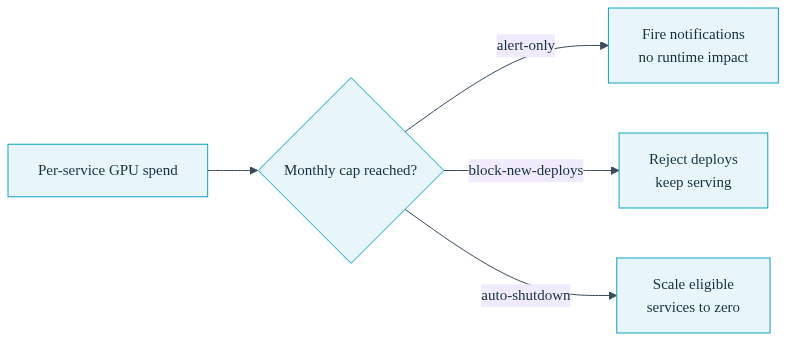
The cap supports three enforcement levels, and choosing one is a governance decision you can document for your auditor:
| At-Cap Action | What Happens When Spend Reaches the Cap |
|---|---|
| alert-only | Fires notification events to your configured channels. No runtime impact. The right default while you are learning what the workload costs. |
| block-new-deploys | Rejects new deploys, scale-ups, and one-off runs with an over-cap error. Running services keep serving. Good for production inference that must stay up but must not grow. |
| auto-shutdown | After a notification countdown, scales eligible services to zero. Services you list under neverAutoShutdown are exempt. Right for experiments and staging where stopping spend beats staying up. |
Before trusting auto-shutdown in anger, you can rehearse it: convox budget simulate-shutdown inference-app prints exactly which services would scale down, in what order, and what the estimated savings are, without touching anything. And when finance or an auditor wants the breakdown, convox cost --app inference-app --format json returns per-service spend by instance type and capacity type, including on-demand versus spot attribution. Every budget mutation is audit-logged with the acting user's identity. The full lifecycle, including recovery after a cap trips, is documented in the budget caps guide.
The other half of spend governance is not paying for idle GPUs in the first place. With KEDA enabled on the Rack (keda_enable=true) and a GPU reservation declared in convox.yml, inference services can autoscale on GPU utilization or inference queue depth, and those two trigger types support scaling to zero, which CPU and memory triggers do not. An internal inference service that sits idle overnight can scale to zero replicas and come back when requests arrive, which on GPU instance pricing is the single most effective cost lever available. Triggers can be managed from convox.yml or directly from the Console with per-threshold editing, as covered in the autoscale triggers documentation. One operational note from the docs worth flagging: services using GPU utilization or queue depth autoscale triggers must be redeployed once after you first enable GPU observability, so the scaler picks up the live metrics endpoint.
Here is the part a vendor pitch usually omits. Bringing GPU hosting inside your own AWS account means your team owns things a managed inference API would own for you. You own AWS GPU service quotas, and G and P family quota increases are a request-and-wait process with AWS, not a toggle. You own instance availability in your chosen regions, including the days when a specific GPU family is constrained. You own the raw EC2 bill, the capacity planning behind it, and decisions like on-demand versus spot for interruptible workloads. Convox removes the Kubernetes and platform toil from that ownership; it does not remove the ownership.
So who should not choose this path? If you have no compliance boundary at stake, no PHI, no regulated data, no auditor asking who touches what, then a managed GPU API is genuinely faster to first token, and that speed may be worth more to you than account ownership. This architecture earns its keep when the alternative is a months-long vendor review for every inference provider the product team wants to try. For a healthcare company at $2M to $50M ARR with an existing AWS BAA and a compliance officer who reads the vendor list carefully, that is almost always the real alternative, and avoiding one review cycle typically pays for the operational ownership many times over in shipped quarters. But if that description is not you, be honest with yourself about it before taking on the quotas and the capacity planning.
No GPU hosting is HIPAA compliant by default; compliance is a property of your controls, agreements, and processes, not of the hardware. Running inference inside your own AWS account makes readiness achievable by inheritance: the workload sits under your existing AWS BAA and the account-level controls you have already documented, rather than adding a new vendor to your PHI data path.
No. The BAA that covers your GPU inference workloads is the one you sign with AWS, because the compute, data, and logs all live in your own AWS account. Convox provides the platform software that runs inside that account; it does not host your infrastructure or process your PHI on Convox-owned systems, so there is no Convox BAA in the picture.
Convox Racks support NVIDIA GPU instances across the P3, P4, G4, and G5 EC2 families, with the DCGM exporter providing telemetry across all of them. G4 and G5 instances are the usual fit for inference serving, while P-family hardware targets heavier workloads. Services request GPUs through the scale.gpu block in convox.yml, and the Rack handles node placement.
Yes, on AWS Racks with KEDA enabled. GPU utilization and inference queue depth autoscale triggers both support a minimum of zero replicas, so an idle inference service can scale fully down and restart when traffic arrives. CPU and memory triggers require at least one replica, so scale to zero specifically needs one of the GPU or queue-based trigger types.
The GPU feature set described in this post, including fractional GPU scheduling, GPU scale to zero, GPU budget enforcement, and the Console GPU dashboard, is available on AWS Racks only. If your healthcare workloads and BAA are on AWS, which is the common case, that is exactly where this architecture applies; plan GPU inference on your AWS Rack rather than another provider.
The lowest-risk way to evaluate this is also the fastest: stand up a sandbox Rack in a non-production AWS account, enable the two GPU parameters, deploy one internal inference service with a $200 budget cap set to auto-shutdown, and let it run for a week. Then take the resulting architecture diagram, one AWS account, zero new vendors in the PHI path, enforced spend ceiling, telemetry in your own Console, to your next compliance review and watch how short that conversation is. The AWS Rack installation guide and GPU observability docs cover the full setup.
See how Convox runs AI workloads in your own AWS account, or if you want to talk through the compliance architecture with someone before the pilot, reach out to our team and bring your compliance officer to the call.


